![duel_logotype-1.png]](https://info.duel.tech/hs-fs/hubfs/duel_logotype-1.png?height=37&name=duel_logotype-1.png)
In short: advocates can turn their affiliate link into a link to any product, range or page on your website, so the people they send land exactly where you want them. The new link tracks just like their standard affiliate link.
🔗 How advocates create a custom link
- In their portal, advocates find the Referrals & Affiliates section (usually on the Overview tab) and click Customise affiliate link under their affiliate link.
- They search for a product or page, or paste a link from your website. Product links work across all of your shop domains.
- They pick a product from the suggestions, or choose Use this link anyway to link to the exact page they pasted, such as a range or collection page.
- They copy their new link and share it. Clicks and orders are tracked to them, exactly as with their standard affiliate link.
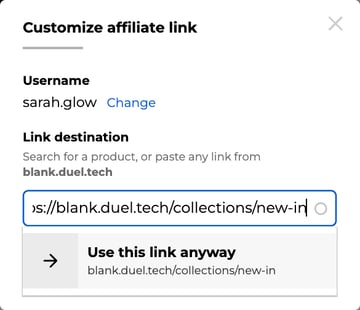
ℹ️ When "Use this link anyway" is available: the page has to be on your own website, and your program has to allow custom page links. If advocates don't see the option, check with your Brand Partner.
💡 Tips for challenges
- If a challenge asks advocates to promote a specific range or sale page, put the exact page link in the challenge instructions and tell them to choose Use this link anyway. Otherwise they may share a single product or their standard link instead.
- Product and e-store links inside your challenges, and the Shop Now button in the portal, already go through each advocate's affiliate link, so they're tracked without any extra steps.
📌 Good to know
- When a referral promotion ends, custom links fall back to the advocate's standard affiliate link.
- To change where everyone's standard affiliate link points, for example for a campaign, see Campaign-specific Affiliate Links.