![duel_logotype-1.png]](https://info.duel.tech/hs-fs/hubfs/duel_logotype-1.png?height=37&name=duel_logotype-1.png)
Loyalty is now a legacy feature (September 2026).
Loyalty gave advocates points on direct-to-site orders: orders matched to an advocate by email only, with no link or code. Direct-to-site orders aren't program revenue, so they're no longer included in your revenue figures.
When an advocate buys through their own link or code, that's a self-purchase. The program drove the sale, so it counts as advocate revenue, but the advocate earns no commission on it. They keep any discount their code carries. See Duel glossary and Insights Dashboard Definitions.
You may still see Loyalty in parts of the dashboard while legacy references are cleared up. The rest of this article describes the legacy settings for reference.
What is Loyalty?
Loyalty Rule Breakdown
Set up Loyalty (legacy)
Order tracking is required to setup loyalty in an automated function.
What is Loyalty?
Loyalty lets advocates gain points through spending directly with the brand. The functionality works in the following way:
- Our order tracking implementation is required.
- Duel then checks if an order is associated with an advocate through matching their email to the email that placed the order.
- If loyalty is switched on then Duel will attribute points based on the loyalty rules in place.
Loyalty Rules Breakdown (legacy)
Allocation rules
The main settings required to begin rewarding loyalty, each rule is a currency conversion.
In the example to the right the advocate's in the programme will receive 1 point for every GBP spent and 2 points for every AUD spent.
This can also be specified per group and/or tier.
Allow new Advocate to claim loyalty points
Advocates can claim loyalty points from an order if they signup to the programme within the specified timeframe after the order was placed.
Cap loyalty points
The ability to cap loyalty points per purchase or per Advocate.
This can be implemented to minimise the ability for advocates pay to win.
Defer loyalty points attribution
The ability to hold out on rewarding loyalty by X number of days, to account for returns for example.
Set up Loyalty (legacy)
- Navigate to Advocates > Loyalty
- Turn on Enable loyalty rewards and set up the loyalty conversion rules as required
- Then Navigate to Advocates > Groups > Group profiles > select appropriate group profile> Overview page
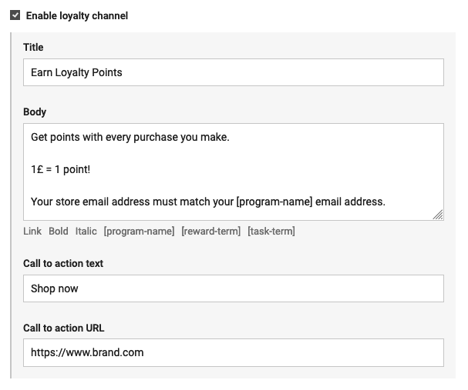
- Enable the loyalty channel and add in copy explaining to your advocates the loyalty they can earn & add in a CTA to your e-commerce