![duel_logotype-1.png]](https://info.duel.tech/hs-fs/hubfs/duel_logotype-1.png?height=37&name=duel_logotype-1.png)
In short: Insights shows your whole advocacy programme in one place: the value your advocates create, who they are, how your challenges perform and what content they post. Every chart can be filtered, compared and exported.
📑 On this page
🔓 Who has Insights
Insights is being switched on brand by brand. Your Brand Partner will confirm when it goes live for you and take your team through the dashboard, including anywhere you may see variance from the dashboards you use today. From then on, Insights is your single source of truth for programme performance. It brings over 50 metrics into one dashboard and replaces the QuickSight and Kibana reports and the old Insights tab. There's nothing for you to set up.
💡 Everyone with access to your Duel dashboard can see all of Insights, including revenue. Decide who on your team should have dashboard access before you share it.
🧭 Finding your way around
Click Insights in the top menu of your Duel dashboard, or go straight to dashboard.duel.tech/insights.

The menu on the left has four sections, and tabs at the top of each section switch between views.
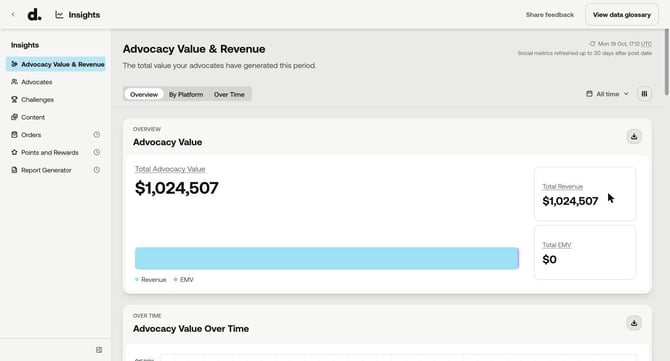
💷 Advocacy Value & Revenue: what your programme returned
The headline figure is Total Advocacy Value: your revenue plus Earned Media Value (EMV), with Revenue and EMV shown beneath it. Advocacy Value Over Time plots all three, and Revenue Over Time breaks revenue down by source. Switch between Overview, By Platform and Over Time.
👥 Advocates: who is driving that value
- Overview: your sign-up funnel (applications, accepted, activated) and rate cards.
- By Status and Over Time: active and inactive advocates.
- Promotion: tier health, promotion and churn.
- Demographics: gender, age, location and social platform.
- Rejection analysis: acceptance, activation and top rejection reasons.
- Advocate leaderboard: ranks advocates by Advocacy Value, Revenue, EMV, Orders, Commission, Social Reach, Impressions, Engagements and Engagement Rate. Search it, show the top 10, 20 or 50, and click a name to open the advocate's profile.
🏆 Challenges: what you asked for and what came back
- Overview: the challenge funnel, from impressions to submissions to approvals, plus KPI cards.
- Performance: impressions over time and by challenge type.
- Challenge leaderboard: ranks your challenges, so you can see which are worth running again.
📸 Content: what your advocates published
- Overview and Performance Trends: how content performed, by channel and type.
- Content Leaderboard: replaces the Content Gallery and sorts posts by reach, impressions, engagements, engagement rate and EMV.
💡 The Content Leaderboard covers Instagram and TikTok posts (not Stories or YouTube). The rest of the Content section covers all your connected platforms.
Menu items with a clock icon are marked Coming soon and aren't available yet.
📅 Choosing a date range and comparing periods
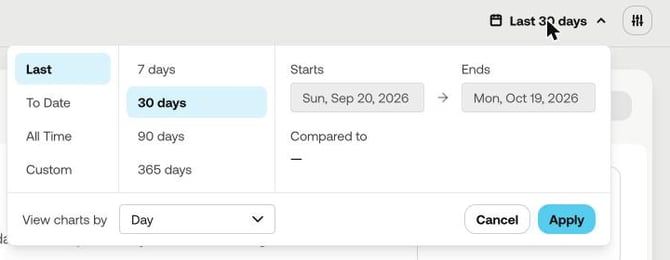
Use the date button at the top right of any section. You can pick:
- Last 7, 30, 90 or 365 days
- To Date
- All Time
- Custom start and end dates
Add a period under Compared to to see two periods side by side, with the percentage change on each metric. View charts by sets how charts group the data (for example by day).
🎯 Filtering
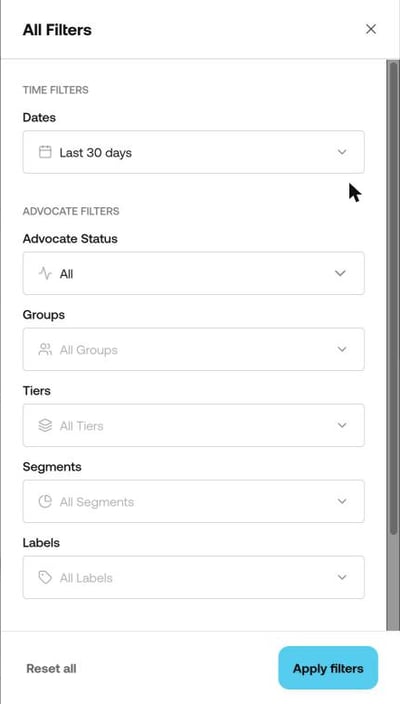
Click the filter button next to the date range to open All Filters:
- Dates
- Advocate filters: Advocate Status, Groups, Tiers, Segments and Labels
- Challenge filters: Submission Status
Click Apply filters. Your filters stay in place as you move between sections, so you can follow the same group of advocates across Insights. Reset all clears them.
💡 Group, tier and label filters use each advocate's current group, tier and labels, not the ones they had at the time.
💷 What the main numbers mean
Hover over any underlined metric name to see its definition, or click View data glossary at the top right for every metric and how it's calculated.
- Total Advocacy Value: your revenue plus your EMV. It's the headline measure of the value your programme creates.
- Total Revenue: revenue attributed to your programme across every tracked channel, net of discounts and excluding cancelled and returned orders.
- Revenue channels (in Revenue Over Time):
- Affiliate Revenue: purchases through advocates' affiliate links, within your click window (typically 7 days).
- Referral Revenue: purchases using an advocate's personal referral code. If a referral code is used on a purchase that came through an affiliate link, it counts here.
- Promotional Revenue: purchases using a promo or discount code issued to an advocate.
- UGC Links Revenue: purchases after clicking a shoppable link on advocate content in your galleries.
- Storefront Revenue: purchases that started on an advocate's Duel storefront.
- Self-purchases: advocates' own orders placed through the platform. Advocates don't earn commission on these.
- Unmatched Revenue: programme-driven sales that couldn't be matched to an individual advocate, for example because of a lost tracking reference or a deleted advocate.
- EMV (Earned Media Value): the estimated cost of reaching the same audience with paid social ads. It combines EMV (CPM), based on impressions, and EMV (CPC), based on reactions and comments, using your agreed CPM and CPC rates (industry defaults where none are set).
⬇️ Exporting data
Each chart has a download button at its top right. It exports that chart's data as a CSV, with your current date range and filters applied.
🔄 How up to date is it?
Figures are rebuilt regularly through the day, so the most recent day or two may lag slightly. The time at the top right of each section shows when the data was last refreshed; it always shows the oldest update in that view, so you know the figures are at least that current. Social metrics such as views, reactions and EMV keep updating for up to 30 days after a post goes live, so recent figures can still change. For comparisons, closed periods such as a full past month are the most reliable.
🤔 Why your numbers might look different
Insights runs on Duel's central reporting data, the same source behind the reports we share with you. That makes the numbers consistent across everything we send, but some figures will differ from what you saw before. That's expected: in most cases a metric is now calculated more consistently, not because your performance changed. Open a reason below to see what's behind it.
Revenue now includes every source
Total Revenue covers affiliate, referral, storefront, promotional, UGC links, self-purchases and orders we couldn't match to an advocate. Only active orders count, so cancelled orders are excluded. If a figure you used before covered a narrower set, it will have moved.
Some labels have changed
For example, "Unattributed" is now "Unmatched". The underlying order sets were tidied up at the same time, so like-for-like comparisons with old screenshots won't always line up.
EMV is calculated more consistently
EMV uses your agreed CPM and CPC rates, with industry defaults where none are set. It also depends on social content being collected, which can take up to a month to fully catch up, so recent periods may rise over time. Because Total Advocacy Value is revenue plus EMV, it moves with EMV.
EMV can go down
If an advocate's challenge submission is removed in moderation or flagged as fraudulent, the EMV from that content is removed too. So a period's EMV can fall after it was first reported.
Data refreshes on a schedule, not instantly
Figures are rebuilt regularly through the day, so the most recent day or two may lag slightly. Closed periods, such as a full past month, are the most reliable comparison.
Advocates are counted as people, not applications
Someone who applied twice counts once. Acceptance and rejection rates are based on the applications you've reviewed, not everyone who signed up.
Active advocates use a rolling 60-day window
In the all-time view, an advocate counts as active if they completed a challenge or drove a sale in the last 60 days. The window is measured from today, so the number changes daily. It may be lower than before, and it now means something you can act on.
Advocate-level revenue won't add up to the brand total
Advocate views only show orders matched to a specific advocate. The brand total also includes unmatched orders.
Challenge submissions are lower, and the submission rate makes sense again
A submission used to be logged for every action step inside a challenge, so a challenge with two steps recorded two submissions. That's why the submission rate could go above 100%. Each advocate's attempt at a challenge now counts as one submission, however many steps it has.
🤝 If a figure still doesn't reconcile: raise it with your Brand Partner. Where a number can't be explained by the changes above, your Brand Partner and our Product team agree on it before it's used in reporting.
💬 Feedback and help
Use Share feedback at the top of Insights to tell us what would make it more useful. For questions about your figures, contact your Brand Partner, or raise a request through the Support Portal.