![duel_logotype-1.png]](https://info.duel.tech/hs-fs/hubfs/duel_logotype-1.png?height=37&name=duel_logotype-1.png)
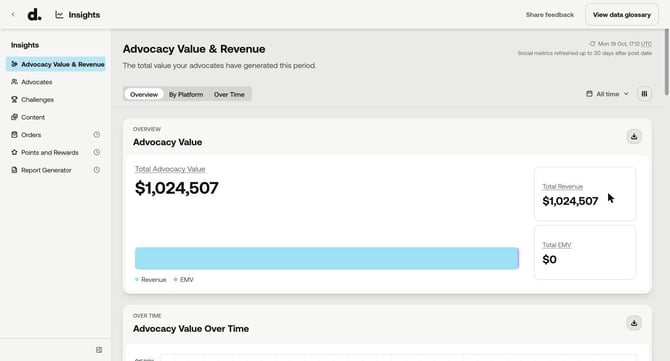
Insights has been rebuilt as one dashboard for your whole advocacy programme, in four sections. It brings over 50 metrics together and replaces the QuickSight and Kibana reports and the old Insights tab.
💻 Click Insights in the top menu of your Duel dashboard, or go to dashboard.duel.tech/insights
🗓️ Rolling out brand by brand. Your Brand Partner will confirm when Insights goes live for you and take your team through it.
📁 What's New
- Four sections: Advocacy Value & Revenue, Advocates, Challenges and Content, each with tabs for different views.
- Total Advocacy Value: one headline figure combining your revenue and Earned Media Value (EMV).
- Leaderboards: rank your advocates, challenges and content (the Content Leaderboard replaces the Content Gallery).
- Filters that follow you: filter by advocate status, groups, tiers, segments, labels and submission status, and the filters stay in place as you move between sections.
- Compare periods: put any two date ranges side by side, with the percentage change on each metric.
- CSV export on every chart, with your date range and filters applied.
- Data glossary: hover over a metric name for its definition, or open View data glossary for every metric.
🤔 Your numbers may look different
Insights runs on Duel's central reporting data, so some figures will differ from the dashboards you used before. In most cases that's because a metric is now calculated more consistently, not because your performance changed. For example, challenge submissions now count once per challenge attempt, and active advocates use a rolling 60-day window.
📖 Learn more
For a full tour, what each number means and all the reasons figures may differ, read Using the new Insights dashboard.