![duel_logotype-1.png]](https://info.duel.tech/hs-fs/hubfs/duel_logotype-1.png?height=37&name=duel_logotype-1.png)
Overview
How to Enable the Newsletter Opt-In
CRM Integration Options
Overview
The newsletter opt-in feature lets advocates choose to receive brand updates and marketing communications during signup. When enabled, their selection is passed to your connected CRM as a custom property called newsletter.
How to Enable the Newsletter Opt-In
-
Ensure CRM Integration is Active
-
Before adding the newsletter checkbox, confirm that your CRM integration is active in your Duel dashboard. If you haven't set this up yet, speak to your Customer Success Manager.
-
-
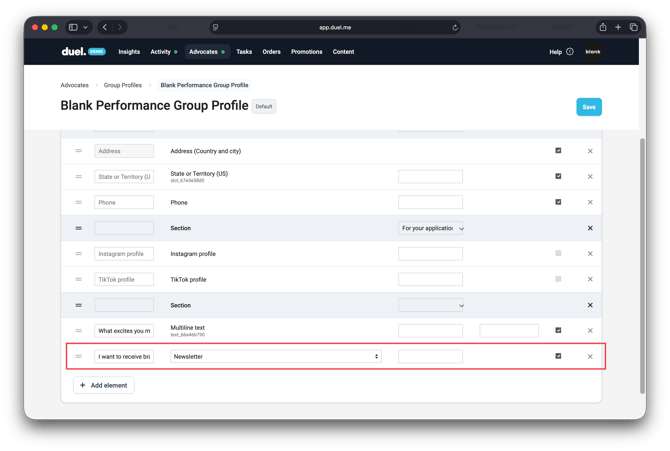
Add the Newsletter Checkbox to Your Signup Form,
-
💻 Navigate to Advocates > Groups > Group Profiles > Select your Group Profile > Signup Form
-
Click Add Element
- From the dropdown, select Profile: Newsletter
- Enter the label text you'd like advocates to see — for example, "I want to receive brand updates and offers".
- Choose whether the field should be required or optional.
-
- Data Transmission
-
Once an advocate completes the Signup Form, their opt-in value is sent to your connected CRM as a custom property. You can use this to manage and trigger marketing communications.
How this works depends on your CRM — see below.
-
CRM Integration Options
Klaviyo (Automatic Integration)
If you’re using Klaviyo, Duel will automatically:
-
Pass opt-in data directly to the Klaviyo API
-
The advocate will be automatically subscribed to your Klaviyo list when their account is created or updated (after their application is approved).
No manual setup is necessary—just confirm your Klaviyo integration is active.
Other CRMs (Manual Integration)
For other CRMs such as Emarsys, HubSpot, or Custom API connections
-
Duel passes the checkbox value as a custom field (e.g.
newsletter: true). -
You or your technical team will need to handle the opt-in logic within your CRM
-
Ensure that this custom field is used to trigger email marketing workflows appropriately
🚨 Note: Duel passes the data, but does not manage subscription logic for non-Klaviyo CRMs. Make sure your CRM is configured to action the newsletter field appropriately.