![duel_logotype-1.png]](https://info.duel.tech/hs-fs/hubfs/duel_logotype-1.png?height=37&name=duel_logotype-1.png)
How Attribution Works
Server-Side Order Tracking with PUT
First-Party Click-ID Setup
Legacy Endpoints
Troubleshooting
Related Articles
💡 Average integration time: 1 to 2 hours for the server-side API path.
Set up secure, reliable order tracking by connecting your store's backend directly to Duel's API. This article covers sending orders, handling updates, refunds and cancellations, verifying attribution, and setting up Duel's first-party click-id so attribution survives ad blockers and browser storage limits.
How Attribution Works
When one of your advocates shares a link or code, Duel needs two things to credit them for a sale: the identity carried on the shopper's journey, and the order you report. They meet on the order you send us.
The identity reaches Duel in one of these forms:
| Mechanism | What the shopper does | What reaches your systems |
|---|---|---|
| Advocate link | Clicks an advocate's share link | Your store URL receives a duel_a parameter, the advocate's identity plus a click reference, for example ?duel_a=jane.doe+k3j2h4g5f6d7s8a9 |
| Promo or referral code | Enters a code at checkout |
The code itself, sent in the See more information in Using Promo Codes on the PUT Order Endpoint |
| UGC gallery link | Clicks a product in a Duel UGC gallery | A duel_c token on the URL |
| Loyalty | An advocate shops with you directly | Their email, matched to their advocate profile |
Duel resolves these signals into exactly one crediting mechanism per order: referral code, promo code, affiliate link, UGC link, or loyalty. When an order carries both an advocate's referral code and an affiliate-link identity, the referral code wins. A general promo code doesn't displace link attribution, it's recorded alongside it. The order is only ever recorded once, with every applicable channel evaluated, so an order is never double-attributed.
Getting these identifiers to Duel is what makes attribution possible. An order that arrives without any of them can't be credited to your programme, so real advocate-driven revenue becomes invisible. That's why the field reference below spends as much space on where each value comes from as on its type.
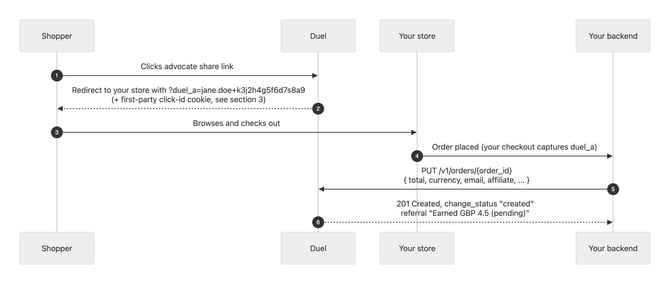
Here's the flow end to end:
- The shopper clicks an advocate's share link.
- Duel redirects them to your store with
?duel_a=jane.doe+k3j2h4g5f6d7s8a9on the URL, plus a first-party click-id cookie (see the click-id section below). - The shopper browses and checks out. Your checkout captures the
duel_avalue. - Your backend sends the order to Duel with
PUT /v1/orders/{order_id}, including the total, currency, email, and affiliate value. - Duel responds
201 Created, with a change status of "created" and a referral outcome such as "Earned GBP 4.5 (pending)".
Choosing Your Integration Route
If you run your store on Shopify, install the Duel Shopify app and none of this article applies to you.
Everyone else uses the server-side API below, with the first-party click-id completing the browser side.
🚨 Already running your affiliate programme through a network like Impact or Rakuten? Talk to your Duel contact before scoping any build. That integration path isn't covered in this article.
Server-Side Order Tracking with PUT
One endpoint handles the entire order lifecycle:
PUT https://api.duel.me/v1/orders/{order_id}
It creates the order if it doesn't exist, and updates it if it does. First sends, corrections, partial refunds and cancellations are all the same call. There's no create/update split, and the call is safe to retry.
Authentication
All requests use HTTP Basic authentication.
💻 Navigate to Settings > Integrations > API > Configure API Users to create your API credentials.
Send them on every request:
Authorization: Basic base64(username:secret)
Your username and secret are the pair from Settings > Integrations > API > Configure API Users.
Combine them as username:secret and base64-encode the whole string, that's the value that goes after Basic.
Most tools handle this for you, curl's -u username:secret flag (used in the canonical request below) encodes it automatically, and most HTTP client libraries have a built-in basic-auth option so you rarely need to build the header by hand.
If you do need to build it manually, echo -n "username:secret" | base64 gives you the encoded value.
| Failure | Response |
|---|---|
No Authorization header |
401 {"error": "Authentication required"} |
| Wrong username or secret | 401 {"error": "Invalid credentials"} |
Credentials identify your brand. Every order you send is scoped to your account automatically. Treat the secret like a password: server-side only, never in browser code.
Request Reference
Send a JSON body with Content-Type: application/json. Field names are shown in snake_case; camelCase equivalents are also accepted.
Identity and money
| Field | Type | Required | What it does |
|---|---|---|---|
order_id (path) |
string | Yes | Your external order reference. Case-insensitive and stored uppercased, unique per brand. It's the idempotency key for the whole lifecycle. |
total |
number, 0 or more | Paired with currency |
The order total as charged to the customer, after discounts. Commission is calculated from this figure, so use a consistent basis. Send 0 to cancel the order (see the lifecycle section below). Always send the corrected total rather than a negative adjustment: negative values are clamped to 0, which cancels the order. |
currency |
string | Paired with total |
ISO 4217 code, for example GBP. Fixed at creation, an update can't change it. |
total_gross |
number | Recommended | Order total before promotional discounts. Stored alongside total so your reporting can show discount impact; commission still calculates from total. Fixed at creation. |
date |
string | Recommended | Order time, ISO 8601, for example 2026-07-28T14:03:00Z. Up to 12 hours in the future is accepted. Defaults to the time we receive the order, and is ignored on updates. An invalid date rejects the whole request with a 400. |
total and currency must be sent together or not at all. Sending one without the other is rejected with 400 {"invalid_order_error": "Total and currency must be paired"}.
Attribution
| Field | Type | Required | What it does |
|---|---|---|---|
email |
string | Recommended | The purchaser's email, plain text or a SHA-256 hex digest. Enables loyalty matching and self-referral detection. Hash the lowercased address, sha256("sam@example.com") rather than sha256("Sam@Example.com"), or it won't match. See Hashed Emails. |
promo |
string or array of strings | If applicable | Promo or referral code(s) applied to the order. For multiple codes, pass an array; each is evaluated and reported individually. |
affiliate |
string | If applicable | The duel_a value your storefront captured, verbatim, for example jane.doe k3j2h4g5f6d7s8a9 (the + is how the space appears in URLs). The advocate's username alone also works, though including the click reference gives you click-level reporting. Send only the duel_a value here. Forwarding another network's affiliate ID is a common multi-network mistake, and produces referral_error: "Unrecognised affiliate" with no attribution. Placeholder junk such as "", "null", "undefined" or "false" is ignored rather than stored. |
ugc |
string | If applicable | The duel_c token, if your storefront captured one from a UGC gallery click. Attributes the order to the advocate's content. |
Customer and enrichment
| Field | Type | Required | What it does |
|---|---|---|---|
customer_id |
string | Recommended | Your stable customer identifier. Powers lifetime-value reporting and repeat-customer attribution: a returning customer's order with no link or code is still attributed to the advocate who originally brought them (recorded for reporting, it doesn't create commission). |
new_customer |
boolean | Optional | true (or "y") if this is the customer's first order. Powers the new-versus-repeat customer split in your reporting. It doesn't change attribution or commission. |
instore |
boolean | Optional | true (or "y") marks an in-store or offline order. Used for reporting and order filtering, with no effect on attribution logic. |
secondary_id |
string | Optional | A second reference of yours, for example a PSP transaction ID or ERP reference. Stored and indexed for reconciliation, but not used by Duel's attribution logic and not returned by GET. |
meta |
object | Optional | Free-form passthrough for your own bookkeeping. Flat scalars only (strings truncated to 1024 characters, numbers, booleans). The first 50 keys are kept, and keys containing a . or starting with $ are dropped. Replaced wholesale on every update that includes it, and not returned by GET. |
Reward overrides
Omit these unless you deliberately manage rewards per order.
| Field | Type | What it does |
|---|---|---|
points |
integer, 0 or more | Overrides the points the advocate earns for this order. |
commission |
number, 0 or more | Overrides the commission amount. Must be sent together with commission_currency. Accepted at creation; on an update, applied only while the existing commission is still pending. |
commission_currency |
string | Currency of the commission figure. |
Unknown fields never fail the request. They come back as input_error: "Unsupported parameter" in an otherwise successful response, so check the response body for typos ("emial" won't return a 400).
The Canonical Request
curl -X PUT "https://api.duel.me/v1/orders/WEB-10021" \
  -u "youruser:yoursecret" \
  -H "Content-Type: application/json" \
  -d '{
    "total": 45.00,
    "total_gross": 50.00,
    "currency": "GBP",
    "date": "2026-07-28T14:03:00Z",
    "email": "sam@example.com",
    "promo": ["SAVE10"],
    "affiliate": "jane.doe k3j2h4g5f6d7s8a9",
    "customer_id": "CUST-88231",
    "new_customer": true,
    "secondary_id": "psp_9f81c2",
    "meta": { "warehouse": "LDN-2", "basket_items": 3 }
  }'
For a typed client instead of raw HTTP, generate one for your stack from the OpenAPI specification. The schema there is the machine-readable version of this reference.
Reading the Response
The status code tells you whether the order was created or updated. The body tells you whether it was attributed, and the two are independent.
201 Created means a new order was stored. 200 OK covers anything else: an update, an unchanged re-send, or a request that was accepted but attributed nothing.
Every write response carries a report:
| Field | Meaning |
|---|---|
id |
Your order reference, echoed back in uppercase. |
change_status |
created, updated, not modified (nothing changed), or none (processing stopped before any write, for example nothing to attribute). Omitted on 400 rejections. |
referral, redemption, loyalty, attribution, customer |
Per-channel outcome messages, present when the channel did something, for example "referral": "Earned GBP 4.5 (pending)" or "loyalty": "Tracked". |
exit |
Why processing stopped early, when it did, for example "No channels" or "No change". |
*_error keys |
Per-channel problems: input_error, referral_error, redemption_error, loyalty_error, attribution_error, customer_error, invalid_order_error, conflict_error, service_error. These are informational in a 2xx response; the rest of the order still processed. |
🚨 The one response you shouldn't ignore: a 200 with "change_status": "none" and "exit": "No channels" means the order matched no advocate, no code, and no customer history, and wasn't stored. If you expected attribution, treat this as a failure and check the affiliate/promo values you sent.
The Order Lifecycle
First send:
PUT /v1/orders/WEB-10021
→ 201 Created
{
  "id": "WEB-10021",
  "redemption": "SAVE10",
  "referral": "Earned GBP 4.5 (pending)",
  "change_status": "created"
}
The advocate's commission is created pending, tied to this order.
Same payload re-sent, whether a retry or a replayed webhook, changes nothing:
PUT /v1/orders/WEB-10021
→ 200 OK
{
  "id": "WEB-10021",
  "exit": "No change",
  "change_status": "not modified"
}
Attribution is one-shot per order. Once set, re-sent affiliate and promo values never overwrite it, which is why blind retries are safe. When a re-send does change something else, the response also carries informational errors about the attribution fields, such as referral_error: "Cannot be overwritten", rather than about the update itself.
Partial refund, send the new total:
PUT /v1/orders/WEB-10021   { "total": 30.00, "currency": "GBP" }
→ 200 OK
{
  "id": "WEB-10021",
  "change_status": "updated"
}
Percentage-based commission follows the stored rate against the new total automatically. Note that currency, total_gross and date are fixed at creation, an update can't change them. Commission settles only after your returns window closes, so refunds sent promptly are reflected before anything is paid out.
Full cancellation, send total: 0:
PUT /v1/orders/WEB-10021   { "total": 0, "currency": "GBP" }
→ 200 OK
{
  "id": "WEB-10021",
  "change_status": "updated"
}
The order is marked cancelled and any pending commission is cancelled with it.
Verify any order with GET:
GET /v1/orders/WEB-10021
→ 200 OK
{
  "id": "665f2a...",
  "order": "WEB-10021",
  "total": 45,
  "currency": "GBP",
  "referral": {
    "channel": "code",
    "self_referral": false,
    "commission": { "total": 4.5, "currency": "GBP" }
  },
  "redemptions": [
    { "code": "SAVE10", "promo": { "id": "60b1...", "name": "Summer promo" }, "type": "referral" }
  ],
  "created": "2026-07-28T14:03:00.000Z"
}
GET /v1/orders/WEB-99999
→ 404 { "error": "Not found" }
total always reflects your latest send. A 404 on GET means the order never reached Duel, whether that's a different set of credentials, a genuinely different order ID, or a failed send, and it's the definitive self-service check before contacting support.
You can also list orders with GET /v1/orders?limit=20&filter.updated_since=2026-07-01, with cursor pagination (before/after), useful for periodic reconciliation against your own systems.
Errors and Retries
| Status | Meaning | Retry? |
|---|---|---|
400 |
Rejected before any write: missing order ID, unpaired total/currency, invalid date. | Fix the payload first, the same request fails the same way. |
401 |
Authentication problem. | After fixing credentials. |
404 |
GET for an order that doesn't exist. |
Not applicable. |
429 |
Rate limited. | Yes, back off and retry, honouring the Retry-After header if present. |
5xx |
Transient server issue. | Yes, safe to retry. |
Because PUT is keyed on your order ID, retries converge: a retried create that already succeeded just becomes a harmless "not modified". Queue and retry 429, 5xx and network failures with exponential backoff, and never blind-retry a 400. A simple dead-letter queue for orders that still fail after retries is worth building.
First-Party Click-ID Setup
The server-side API tells Duel about orders. The browser side is where the advocate's identity gets captured, and it's where ad blockers, Safari's storage limits and rogue "coupon" extensions can lose or overwrite attribution. The first-party click-id closes that gap.
What It Is
When a shopper clicks an advocate's link, Duel's response sets a signed, HttpOnly, Secure cookie called duel_click on your own community subdomain, the same subdomain that hosts your Duel advocate portal, for example community.yourbrand.com:
GET https://community.yourbrand.com/s/jane.doe
→ 302 Found  (a short redirect chain landing on https://www.yourbrand.com/?duel_a=jane.doe+k3j2h4g5f6d7s8a9)
Set-Cookie: duel_click=<signed token>; Max-Age=2592000; Path=/; HttpOnly; Secure; SameSite=None
It's first-party, set host-only on your own subdomain, so it isn't third-party-cookie-blocked. It's HttpOnly and signed, so page scripts, including hijack or coupon extensions, can't read, forge or overwrite it. It carries no personal data, only the advocate reference and a click reference. It lasts 30 days and refreshes on every click, so a repeat click starts the window again. Safari caps cookies on CNAME'd subdomains at about 7 days from the last click, though repeat clicks roll it forward.
At checkout, when the attribution call goes through that same subdomain, the browser attaches the cookie automatically. Duel treats a valid duel_click as the authoritative advocate identity for that request, so if the page-captured duel_a was lost to cleared storage or ITP, or was tampered with, the cookie restores or corrects it:
GET https://community.yourbrand.com/attribution?slug=yourbrand&order=WEB-10021&total=45.00¤cy=GBP&affiliate=jane.doe+k3j2h4g5f6d7s8a9
Accept: application/vnd.duel+json
Cookie: duel_click=<signed token>
→ 204 No Content
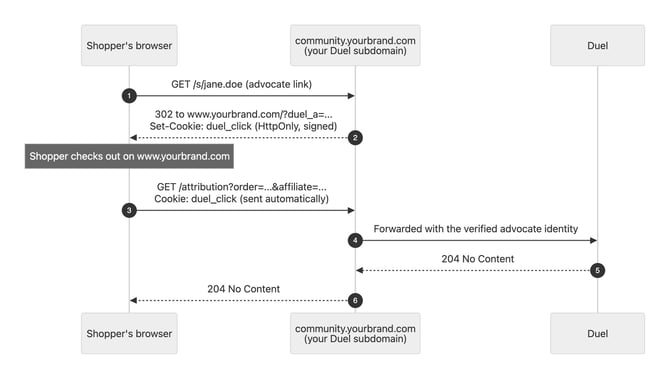
Here's the browser-side flow end to end:
- The shopper clicks an advocate's link, for example
community.yourbrand.com/s/jane.doe. - Your community subdomain redirects them to your store with
?duel_a=...on the URL, and sets the signedduel_clickcookie. - The shopper checks out on your store.
- Your storefront calls the attribution endpoint on your community subdomain, and the browser attaches the
duel_clickcookie automatically. - Duel verifies the advocate identity and responds
204 No Content.
Prerequisites
- A Duel community subdomain on your own domain, for example
community.yourbrand.com, same-site with your store. Your Duel contact sets this up with you if you don't have it yet.
🚨 Shopify stores without a custom storefront domain can't meet the same-site requirement. Use the Shopify app instead.
- Serve the analytics script from that subdomain rather than Duel's CDN. That single change makes the whole attribution flow first-party, since the script automatically sends attribution to the origin it was served from.
- The click-id is a first-party tracking cookie set server-side. Include it in your cookie policy and consent management platform like any other attribution cookie.
Setup
- Embed the script on all store pages, stub first, bundle second:
<script nonce="{PAGE_NONCE}">
  window.duel = window.duel || function () { (duel.q = duel.q || []).push(arguments); };
</script>
<script src="https://community.yourbrand.com/brand-advocacy.js" async></script>
Use the brand-advocacy.js filename. The older duel-analytics.js name still works but is being phased out. *analytics* URL patterns get silently blocked by common ad-block and privacy lists, which looks exactly like attribution randomly missing for some shoppers.
- Allow it in your CSP. Exactly two directives matter:
script-src  'nonce-{PAGE_NONCE}' https://community.yourbrand.com;
connect-src https://community.yourbrand.com;
🚨 Name the host explicitly. CSP 'self' is same-origin, and your community subdomain is same-site but not same-origin with your store pages. A missing connect-src is the classic silent failure, where the script loads fine but every attribution call gets blocked. No img-src, style-src or frame-src changes are needed. Don't pin the script with an integrity (SRI) hash either: the script auto-updates at a stable URL by design, so a pinned hash makes browsers silently refuse the next release. If your security review requires SRI, talk to your Duel contact about self-hosting a pinned copy that you own updating.
- Fire attribution on your order-confirmation page:
duel('analytics:attribution', {
  slug: 'yourbrand',
  order: 'WEB-10021',
  total: '45.00',
  currency: 'GBP',
  promo: ['SAVE10']
});
The script appends the captured advocate identity (duel_a/duel_c) automatically, and the request rides through your subdomain with the duel_click cookie attached. The script doesn't auto-detect the confirmation page, so this call is required.
- Verify it's working:
- Click one of your advocates' share links with DevTools open and Preserve Log enabled. The first response in the redirect chain, from
community.yourbrand.com, should carrySet-Cookie: duel_clickwithHttpOnlyandSecureboth ticked. - Place a test order and confirm
GET .../attributionreturns204in the Network tab, with theduel_clickcookie in its request headers and no CSP violations in the console. - Confirm attribution end to end with
GET /v1/orders/{order_id}. Thereferralblock should be present.
Combining with the Server-Side API
Run both. They're complementary, not alternatives.
The server-side PUT call is your system of record for totals, refunds, cancellations and enrichment. Capture duel_a at landing (for example by reading it server-side into your own first-party cookie) and send it as affiliate.
The script and click-id cover the browser journey, and rescue the cases where page-level capture fails.
Both report against the same order ID, and attribution is one-shot per order: whichever arrives first attributes the order, and the other becomes a harmless update. Nothing double-attributes, and no coordination between the two is needed on your side.
Known Limitations
In-app browsers such as Instagram or TikTok often treat each session as disposable, so a shopper who clicks in-app but completes the order later in their real browser starts without the cookie.
Safari caps the cookie at about 7 days from the last click, as noted above.
Load the script with a direct <script> tag where possible. Tag managers can reorder the stub and bundle, and some privacy browsers block tag-manager-injected scripts entirely.
Legacy Endpoints
Earlier integrations used two endpoints that remain supported for backwards compatibility:
POST https://api.duel.me/v1/ordersto create an orderPOST https://api.duel.me/v1/orders/{order_id}to update one, returning404if the order doesn't exist
Don't build new integrations on these. The create endpoint has a sharp edge the upsert endpoint was designed to remove: re-sending an existing order to it opens a one-time, 15-minute window to fill in the blanks, and after that, further re-sends to the create endpoint are rejected with 400 ("Deferred update too late" or "Deferred update already received"). Integrations that fire their updates at the create endpoint, a common shortcut, lose late refunds and corrections as a result.
PUT has no such window. Migrating is a drop-in change: same fields, same authentication, just change the method and URL to PUT /v1/orders/{order_id}.
Troubleshooting
| Symptom | Likely cause and fix |
|---|---|
GET /v1/orders/{id} returns 404 |
The order never reached Duel: wrong credentials (a different brand's scope), a genuinely different order ID, or a failed send. Check your logs for the original response body. Order-ID matching is case-insensitive, so casing differences are never the cause. |
200 with "exit": "No channels" |
Nothing to attribute. The order carried no recognisable code, affiliate, matching email or customer history, and wasn't stored. Check what your checkout actually captured. |
referral_error: "Unrecognised affiliate" |
The affiliate value isn't a Duel advocate. The most common cause is forwarding another affiliate network's ID in the field instead of the captured duel_a value. |
input_error: "Unsupported parameter" |
A field-name typo. Remember this arrives inside a 2xx response. |
invalid_order_error: "Total and currency must be paired" |
Send both fields together, or neither. |
| Hashed emails never match | Hash the lowercased address before applying SHA-256. |
| An advocate's own test order earns no commission | This is deliberate: when the purchaser is the advocate themselves, the order is recorded as a self-referral ("self_referral": true on GET), attributed but unrewarded. Test with a customer identity that isn't the advocate's own. |
| Console shows a CORS error on the attribution call, but orders attribute anyway | Harmless when calling Duel's central endpoint. The browser blocks your page from reading the response, but the request itself was processed. Moving to the first-party setup above removes the error. |
| Attribution missing only for some shoppers | Usually ad blockers. Make sure you're loading brand-advocacy.js, not the legacy duel-analytics.js filename, from your own subdomain. |
| A shopper clicked an advocate link but the order shows no referral | Check whether the order also carried another advocate's referral code. Referral codes take precedence over link attribution, though a general promo code doesn't. Otherwise see the known limitations above (in-app browsers, Safari). |
When escalating, include your order ID, the full request you sent (minus credentials), and the response body. With those three things, most attribution questions resolve in one round-trip. Submit a support ticket.
Related Articles
- OpenAPI specification, to generate a typed client for your stack.
- Hashed Emails via API
- Using Promo Codes on the PUT Order Endpoint
- Duel Shopify App
- Dashboard: Settings, Integrations, API, Configure API Users