![duel_logotype-1.png]](https://info.duel.tech/hs-fs/hubfs/duel_logotype-1.png?height=37&name=duel_logotype-1.png)
Overview
How to Import Orders
CSV Format & Variables
Advanced: Overriding Points & Commission
Backfilling Missing Duel-Attributed Orders
Overview
Duel's order import feature lets you bulk upload orders via CSV. This is useful as a backstop during technical issues, before a full integration is in place, or when backfilling orders that weren't captured at the time of purchase.
🚨 Note: Order import is not a replacement for a live integration. It's a manual process and should be used as a fallback, not a primary sync method.
How to Import Orders
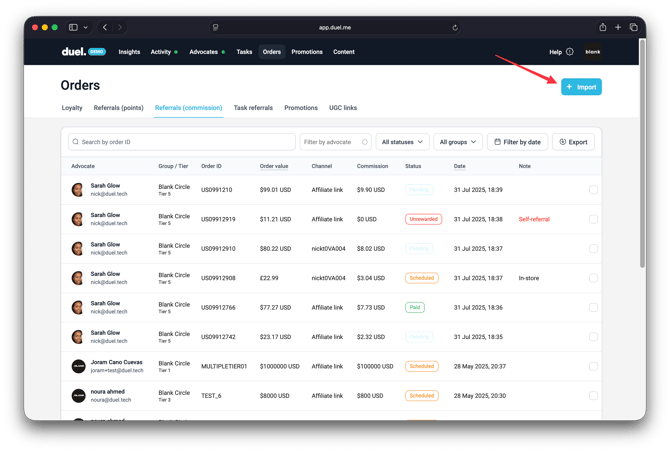
💻 Navigate to Dashboard > Orders > + Import
- Prepare your order data as a CSV, formatted according to the variables table below.
- In your Duel dashboard, navigate to the Orders tab.
- Click + Import in the top right corner.
- Upload your CSV file.
💡 Pro Tip: If you're uploading a large number of orders, split them into batches of around 10,000 rows each for a smoother import.
CSV Format & Variables
Your CSV should be exported from your ecommerce platform or brand database and formatted with the following columns:
🚨 The Date of Order must be in ISO 8601 format: YYYY-MM-DD HH:MM:SS
| Variable | Column Titles | Input | Required | Notes |
| Order Number | id | string | Yes | |
| Order Total | total | string | Yes | |
| Order Currency | currency | string | Yes | Using ISO 4217 currency codes ie. GBP, USD & EUR |
| Date & Time | date | YYYY-MM-DD HH:MM:SS | Yes |
eg: 2022-12-28 |
| Email of Purchaser | string | No | ||
| Promotion Code Used | promo | string | No | If multiple promo codes on one order, separate with a space or comma |
| Affiliate ID | affiliate | string | No |
This is the affiliates id ie. nick.t.4 As seen in our parameter ?duel_a=nick.t.4 |
| In Store Purchase | instore | y | No | “y” indicates the order was placed in store |
| Points | points | string | No | Override points awarded — only use if deviating from existing rules |
| Commission | commission | string | No | Override commission amount — only use if deviating from existing rules |
| Commission Currency | commission_currency | string | No | ISO 4217 codes — e.g. GBP, USD, EUR |
See an example CSV linked here
Advanced: Overriding Points & Commission
The points and commission columns let you override the default reward values set by your Referrals & Affiliates rules.
A few important things to know:
- There must already be an existing Referrals & Affiliates rule in your Duel account before you can distribute points or commission via CSV upload.
- This feature overrides existing data — for example, if your rule awards 50 points, uploading a value of
100in the points column will update that order to 100 points. - The
commissionvalue must be an exact amount (e.g.2.45), not a percentage.
Backfilling Missing Duel-Attributed Orders
If orders weren't captured at the time of purchase — for example, before your integration was live, or during a tracking gap — you can backfill them using the CSV import. To do this, your ecommerce team needs to pull a list of Duel-attributed orders and export them in the format above.
🚨 Duplicate orders: If an order ID in your CSV already exists in Duel, it won't be imported twice. If there's no change, the order will be ignored. If there is a change — for example, to account for a return or cancellation — the existing record will be updated instead.
Promo Code Orders
These are orders placed using a Duel promo code — this includes referral codes and tier reward codes.
Your ecommerce team should be able to pull a filtered order export based on your active Duel promo codes. Once uploaded, Duel will automatically categorise the revenue as affiliate or promotional depending on how the code was used in your programme.
💡 Pro Tip: Share your full list of active Duel promo codes with your ecommerce team so they can filter accurately.
Affiliate Link Orders
Some orders are placed via an affiliate link without a promo code.
These orders are identified by the presence of the duel_a URL parameter in the session. If you're using Google Analytics or a similar analytics platform, your ecommerce team should be able to filter for orders where the landing URL or session included duel_a.
For the CSV export, you'll need the following in addition to the standard order fields:
- The full
duel_avalue in its own column — ideally the complete value (e.g.duel_a=nick.t.3+j2kef20949pvr5443yy). If only the base advocate ID is available (e.g.nick.t.3), that will also work. - All standard order fields as listed in the variables table above.
Once uploaded, Duel will attribute commission correctly and ensure the revenue is tracked against the right advocate.