![duel_logotype-1.png]](https://info.duel.tech/hs-fs/hubfs/duel_logotype-1.png?height=37&name=duel_logotype-1.png)
Overview
Segments let you group advocates based on labels, with membership updating automatically as label assignments change. You'll need to have at least one label set up before creating a segment.
🚨 Note: Segments are built entirely from labels. If you haven't created any yet, read our Labels article first.
Creating a Segment
💻 Navigate to Advocates > Segmentation > Segments > Create Segment
- Enter a Name and Description to identify the segment and clarify its purpose.
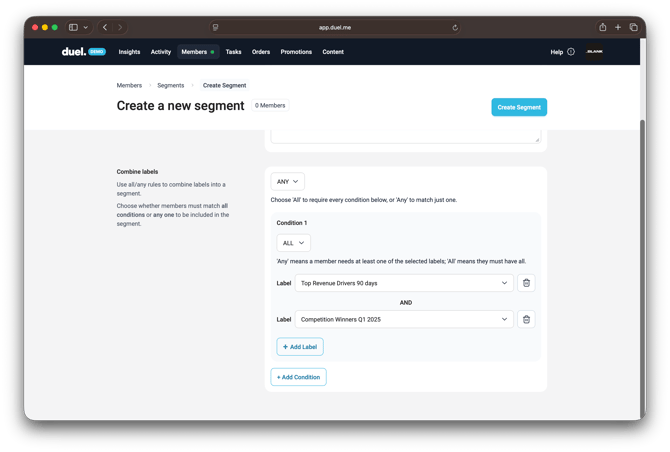
- Use the ALL / ANY selector to set the global condition rule:
- ALL — advocates must meet every condition.
- ANY — advocates must meet at least one condition.
- Add one or more Conditions:
- Use the Label dropdown to select a label (e.g. Competition Winners Q1 2025, Top Revenue Drivers 90 Days).
- Click + Add Label to include additional labels within the same condition.
- Click + Add Condition to create a separate condition.
- Click Create Segment to save.
Combining Labels and Conditions
Labels are tags assigned to advocates — for example, based on location, interest, or performance. They can be static or dynamic.
Conditions are groups of one or more labels. For example:
- Condition 1: IG Reel Content Creators
- Condition 2: Under 18 — Yes
The ALL / ANY rule then determines which advocates are included:
- ALL — advocates must match every condition.
- ANY — advocates must match at least one condition.
This makes it possible to build flexible segments, such as advocates who are either top revenue drivers or competition winners.