![duel_logotype-1.png]](https://info.duel.tech/hs-fs/hubfs/duel_logotype-1.png?height=37&name=duel_logotype-1.png)
What is the Support Portal?
Setting Up Your Account
Tracking and Managing Your Tickets
Submitting a Support Ticket
What is the Support Portal?
The Support Portal is a dedicated customer portal that makes it easier to manage your support interactions with Duel. Rather than relying solely on email, the portal gives you a clear view of every ticket — open, closed, and in progress — so nothing gets lost.
You can access it at any time via the Support Portal link in the Knowledge Base navigation, or directly at info.duel.tech/support-portal.

🚨 Note: You'll need to register using your work or support email you use to submit tickets and no
Setting Up Your Account
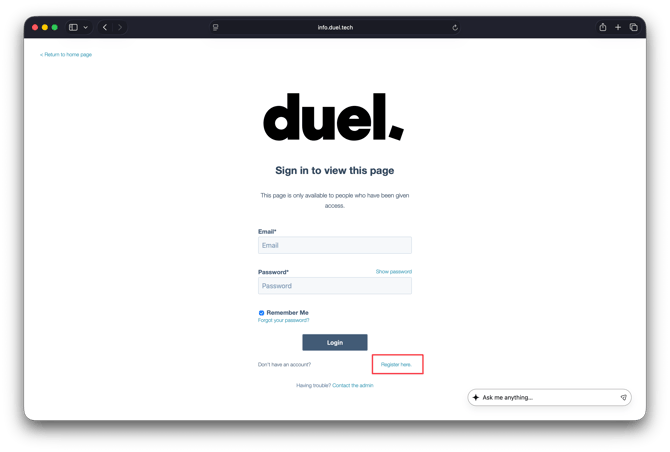
- Go to the Support Portal
- Click Register here on the login page.
- Register using the work or support email you use to submit tickets in duel.
- Once registered, log in using your registered email and password.
Tracking and Managing Your Tickets
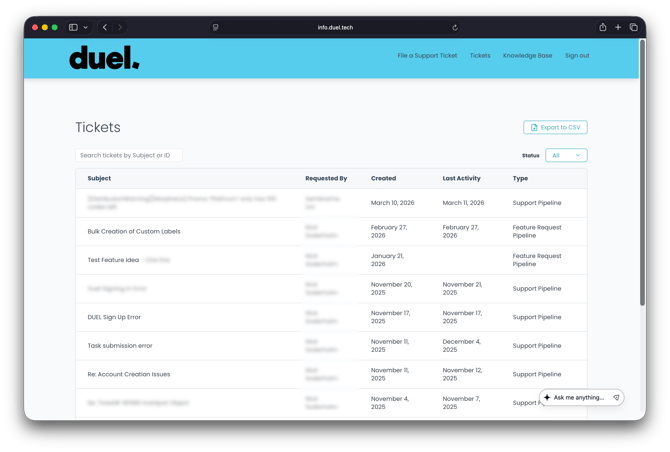
To view your tickets, click Tickets in the top navigation bar after logging in.
You can search and filter your tickets using the following options:
- Search bar — search by subject or Ticket ID
- Status — filter by All, Open, or Closed
Each ticket shows the subject, who raised it, when it was created, the date of last activity and the type of request.
🚨 Note: Only tickets you have submitted with the email address you used to login will show.
Clicking on any ticket opens the full email exchange between you and the Duel team. You can reply directly to any open ticket from within the portal.
💡 Pro Tip: Use Export to CSV in the top right of the Tickets view to download a full record of your ticket history.
Submitting a Support Ticket
Once logged in, click File a Support Ticket in the top navigation bar. You can also submit a ticket directly via the Submit a Support Ticket link in the Knowledge Base navigation.
💡 Pro Tip: Attach any relevant files — screenshots, videos, or documents — directly to your ticket they help us resolve your query faster.
While you can still reach us at brandsuccess@duel.tech, we recommend using the Support Portal as your primary channel — it makes it much easier to track and manage your queries over time.