![duel_logotype-1.png]](https://info.duel.tech/hs-fs/hubfs/duel_logotype-1.png?height=37&name=duel_logotype-1.png)
Developer Documentation
Authentication
Members
Events
Orders
Assets
This article covers the endpoints available in Duel's open API, what each one returns, and how to authenticate your requests.
Developer Documentation
The primary reference for Duel's API is the developer documentation at https://developers.duel.tech/open-api/. This article is a summary overview. For implementation detail, request bodies, and response schemas, always refer to the developer docs.
Authentication
All API requests require authentication using a Bearer token.
You can create API user credentials in the Duel Dashboard under Settings > Intergrations > API > Configure API Users. Once created, pass the token in the Authorization header of every request.
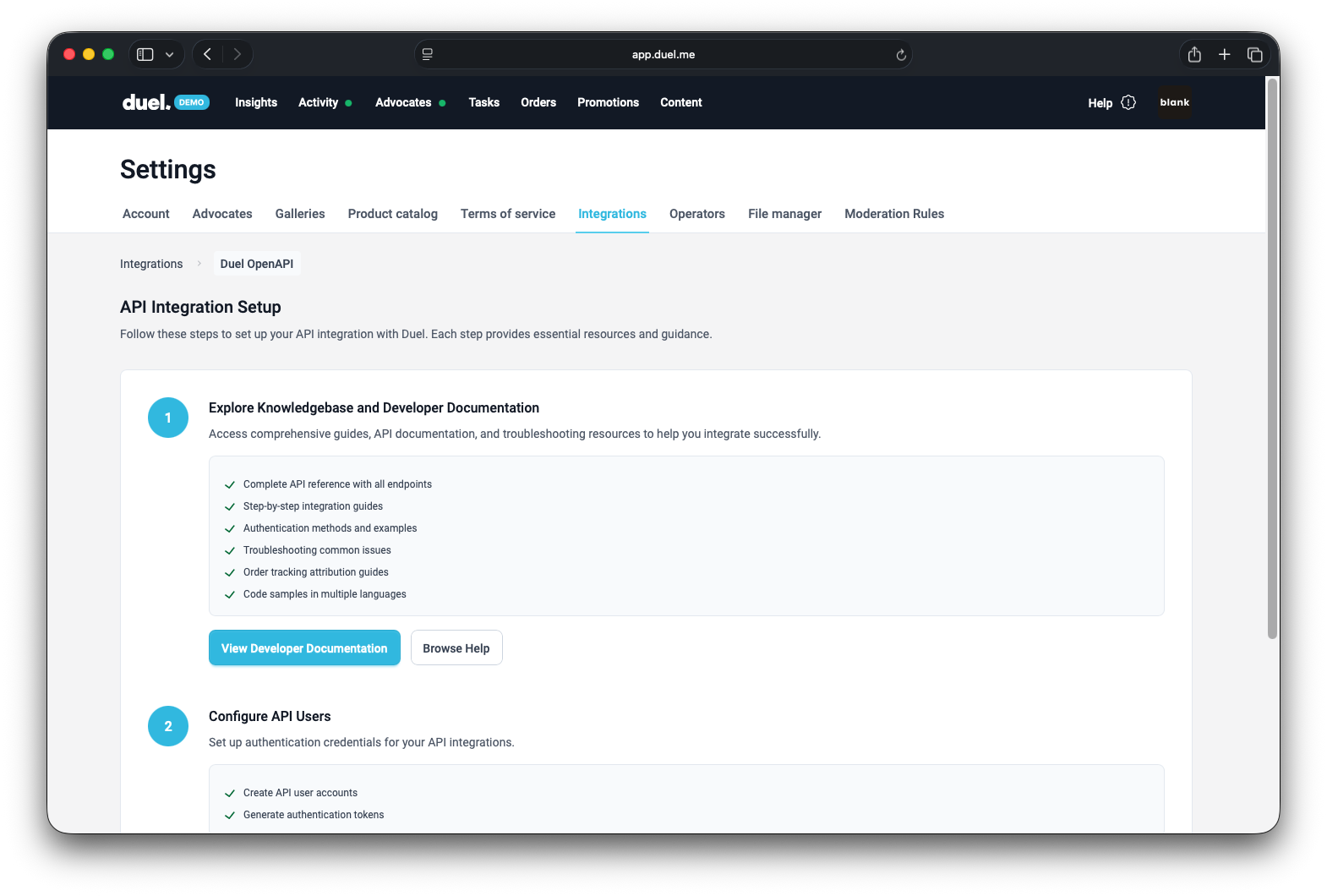
If you do not have an operator login for the Duel Dashboard, speak to your Duel contact.
Members
The Members endpoints let you retrieve information about your advocates, including full lists or individual records. You can use this data to personalise communications or surface advocate-specific data on your eCommerce site.
Member sync is included in Duel's CRM integrations.
Events
The Events endpoints give you access to activity within your Duel programme, such as completed challenges or tier advancements. You can use these to trigger external communications — for example, sending a congratulations email when an advocate reaches a new tier.
Event sync is included in Duel's CRM integrations.
- action_approval: This event is triggered when an action submitted by a member, like a referral or social post, is approved by the brand’s team or automatically by the system. It signals that the action is valid for rewards or recognition.
- action_rejection: This event is triggered when an action submitted by a member is rejected. This usually happens if the action doesn’t meet the program’s guidelines, such as content that isn’t appropriate or a referral that doesn’t qualify.
- action_submission: This event is recorded when a member submits an action, such as uploading content, referring a friend, or completing a campaign challenge. It marks the moment before any approval or rejection happens.
- member_acceptance: This event happens when a new member joins a program, accepts an invitation, or is officially welcomed into an ambassador or loyalty campaign.
- member_payment: This event is logged when a member receives a cash payment, usually as a commission for successful referrals or for completing actions that result in monetary rewards.
- member_reward: This event records when a member earns a reward that isn’t cash-based, such as points, vouchers, or free products, for their participation or completed actions.
- member_tier_up: This event is triggered when a member moves up to a higher level in the program’s tier system, typically based on their activity, referrals, or points collected.
- member_update: This event is recorded when something changes in a member’s profile, such as updating their name, email, or other details, either by the member or an admin.
- purchase_completion: This event logs when a tracked purchase has been completed by a customer. This is often tied to referral or affiliate programs where confirming a completed purchase is essential for rewards and tracking.
- purchase_update: This event is triggered when there’s an update to a previously tracked purchase. It could be a change in the order status, such as when an order is canceled or partially refunded. These updates make sure that rewards, commissions, and reporting stay accurate. (For more details on the types of order updates, see: https://info.duel.tech/help/commission-status-update-jan-2025)
- social_post_refresh: This event is logged when a social post linked to a campaign is refreshed. This can happen either when the system pulls updated engagement metrics, like likes or comments, or when the user edits or resubmits the content for validation.
- task_completion: This event records when a member completes a specific challenge within a program, such as sharing something on social media, completing a challenge, or submitting content.
Orders
The Orders endpoints let you send order data to Duel to power referral attribution, loyalty tracking, and commission calculations.
For new integrations, we recommend using the PUT upsert endpoint, which handles both creation and updates in a single call. For a full guide covering all order endpoints, parameters, and code examples, see Order Tracking via API (Server Side).
Orders sync is included in Duel's Shopify App.
Recommended endpoint:
PUT to https://api.duel.me/v1/orders/{order_id}
Send this whenever an order event occurs, regardless of whether the order has already been sent to Duel. The endpoint creates the order if it does not exist, or updates it if it does.
Assets
The Assets endpoint lets you retrieve all assets from your Duel programme, including user-generated content (UGC) uploaded by advocates. You can use this to build custom galleries or repurpose content on your eCommerce site.
Assets Endpoint Attributes
Each asset object in the response includes:
- file_url: The original file URL, or a large version if the original is unavailable.
- file_type: The MIME type of the asset (for example,
image/jpeg). - date: DateTime when the asset was uploaded or created.
- source: Whether the asset originated from
ugcoroperator. - task_id: The associated challenge identifier, if applicable.
- member_id: The identifier of the advocate who uploaded the asset. Empty if uploaded by an operator.
- product_skus: A list of associated product SKUs.
- social_post_domain: The platform from which the UGC was sourced (for example,
Instagram). - social_post_url: URL to the original social post.
How to Use the Assets API Endpoint
- Authentication: Ensure you have valid API credentials with Duel.
- GET Request:
- URL: /api/v1/assets
- Method: GET
- Headers:
- Authorization: Bearer
- Authorization: Bearer
Response Format:
The response will contain a JSON array of asset information as described above.
Rate Limits
- Response Time: 100ms to 500ms
- Rate Limit: Up to 1,500 requests per minute
- Retry Policy: Maximum of 5 retries, with a 5-minute interval between each attempt