![duel_logotype-1.png]](https://info.duel.tech/hs-fs/hubfs/duel_logotype-1.png?height=37&name=duel_logotype-1.png)
In short: Duel Detect is Duel's automated detection layer for programme fraud. It flags accounts that show signs of suspected programme fraud, pauses their earning while you take a look, and lets you unflag, whitelist or ban them in one click. Every action is recorded.
🚀 Launched: September 2026 (release notes)
🔓 Who has it: Duel Detect is on for all brands, with nothing to set up. Detection has always run behind the scenes at Duel. What's new is that your team can see it and act on it. If you don't see Flagged advocates in your dashboard, speak to your Brand Partner.
📑 On this page
⚙️ How it works
- A flag is a suspicion, not a verdict. It's a temporary state with a reason attached. Genuine advocates can be unflagged at any time.
- Flags come from two places. Duel flags accounts automatically when they match a programme fraud signal (shown as System), and your team can flag accounts by hand (shown as Manual).
- Earning is paused while an advocate is flagged. Points, tier progress, promo codes and rewards are held, and their commission isn't paid out. When you unflag or whitelist them, what was held is released.
- Duel never bans automatically. Banning is always a decision your team makes.
- Flags are per programme. Flagging someone in your programme doesn't affect them in any other brand's programme.
🧭 Where to find flagged advocates
- Go to Advocates › All (or Sign-ups) and click Flagged advocates in the top right.
- The Overview shows how many advocates are flagged, split into System and Manual, with a breakdown by reason.
- Use the filters at the top to narrow the list by reason, group or date, and search by advocate name, email or social handle.
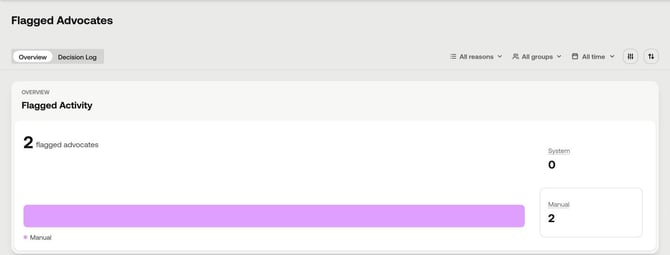
You'll also spot flagged advocates elsewhere in your dashboard:
- A Flagged badge next to their name in Advocates › All. Hover over a flag to see the reason.
- A Flagged filter on the Activity page, so you can find (or hide) submissions from flagged advocates before you moderate them.
🔍 Why an advocate is flagged
Each flag shows its reason in the Reason column, alongside who flagged it and when.
| Reason | Flagged by | What it means |
|---|---|---|
| Referrer Flagged | System | The advocate signed up through a referral from an account that was already flagged. |
| Submission Rate Limit | System | The advocate submitted challenges unusually fast, at a pace that suggests automation. |
| Invalid Social Handle | System | The social handle doesn't look like a genuine personal account, for example a placeholder. |
| Signup IP Rate Limit | System | An unusual pattern of sign-ups was detected. |
| Duplicate Action | System | The same submission was sent more than once. |
| Suspicious Social Handle, Suspicious Email Address, Suspicious Application Responses | Your team | Reasons your team can choose when flagging an advocate by hand. |
| Other | Your team | For anything else, such as several small signals together. Hover over it to read the note your team added. |
💡 Check before you act. Referrer Flagged and Submission Rate Limit can catch genuine, enthusiastic advocates, so take a quick look at their activity before you decide. If genuine advocates keep hitting the Submission Rate Limit, your Brand Partner can adjust it to fit how your programme runs.
✅ Unflag, whitelist or ban
In the Flagged advocates list, hover over an advocate to see Unflag, Whitelist and the ban icon. To act on several advocates at once, tick them and use the buttons that appear above the list.
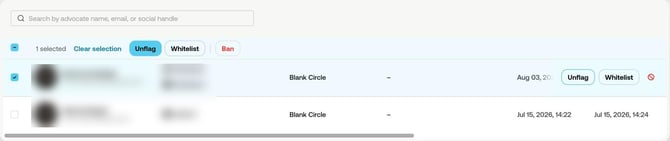
| Action | What it does | Use it when |
|---|---|---|
| Unflag | Clears the current flag and releases anything that was held. Duel can flag the account again later if a new signal appears. | The flag was a one-off and the advocate looks genuine. |
| Whitelist | Clears the flag and stops automatic flags on this account from then on. | You know and trust the advocate, for example a key creator who keeps tripping the same signal. |
| Ban | Removes the advocate's access: they can't log in to your programme, and any active sessions end. | You're confident the account isn't genuine. |
⚠️ Whitelist and Ban are hard to undo. There's no undo button. To reverse a whitelist or a ban, contact Duel Support. If you're not sure, unflag instead. More about bans
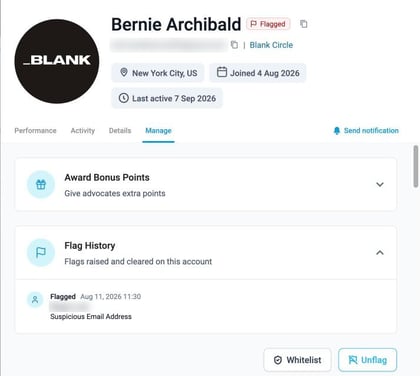
You can also Unflag or Whitelist an advocate from their profile: open them, go to Manage and use the buttons under Flag History.
🚩 Flag an advocate yourself
If something looks off that Duel hasn't caught:
- Open the advocate from Advocates › All.
- Click Flag in the top right of their profile.
- Choose a reason and add a note. Notes help your team, and anyone reviewing later, understand why.
The flag pauses their earning straight away, just like an automatic flag.
📋 Flag History and the Decision Log
Flag History
Every advocate's profile has a Flag History under Manage, listing each flag raised and cleared on the account, when, by whom and why.
Decision Log
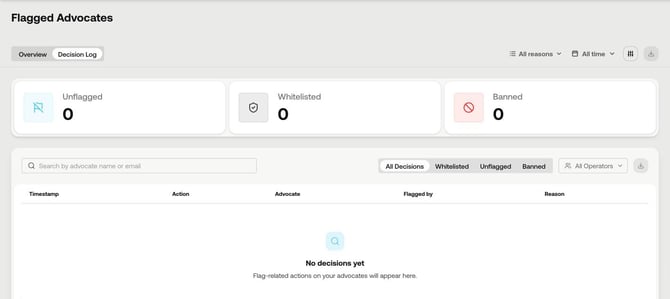
In Flagged advocates, open the Decision Log tab to see every unflag, whitelist and ban across your programme, with totals for each. Filter by decision or operator, search by advocate, and use the download button to export it.
👀 What flagged advocates see
Flagged advocates aren't emailed. When they log in, they see a banner saying their account is under review, with a way to get in touch if they think it's a mistake. The banner never says which signal flagged them.
If an advocate contacts you about it, check their flag in Flagged advocates and unflag them if they look genuine. It's worth letting your customer service team know, as you may get a few more questions after flags are raised.
❓ FAQs
Does Duel ban advocates automatically?
No. Duel flags accounts automatically, but only your team can ban an advocate.
Will a flagged advocate lose their rewards or commission?
No, they're held rather than lost. While an advocate is flagged, their points, tier progress, promo codes, rewards and commission payouts are paused. When you unflag or whitelist them, what was held is released.
What's the difference between Unflag and Whitelist?
Unflag clears the current flag, but Duel can flag the account again if a new signal appears. Whitelist clears the flag and stops automatic flags on that account from then on. Reversing a whitelist needs Duel Support.
Does a flag or ban affect the advocate in other programmes?
No. Flags and bans only apply to your programme.
Can I undo an action?
There's no undo button. You can flag an unflagged advocate again at any time. To reverse a whitelist or a ban, contact Duel Support.
Can I export a record of flag decisions?
Yes. Open Flagged advocates › Decision Log and use the download button.