![duel_logotype-1.png]](https://info.duel.tech/hs-fs/hubfs/duel_logotype-1.png?height=37&name=duel_logotype-1.png)
In short: the E-store tab in each group profile controls where your advocates' affiliate links go and what tracking travels with them: your store URLs, promo code links, UTM and dynamic parameters, deep links and PayPal payout settings.
🧭 Where to find it: Advocates › Groups › Group profiles › select the group profile › E-store. Each group profile has its own settings, so check every profile your advocates use.
📑 On this page
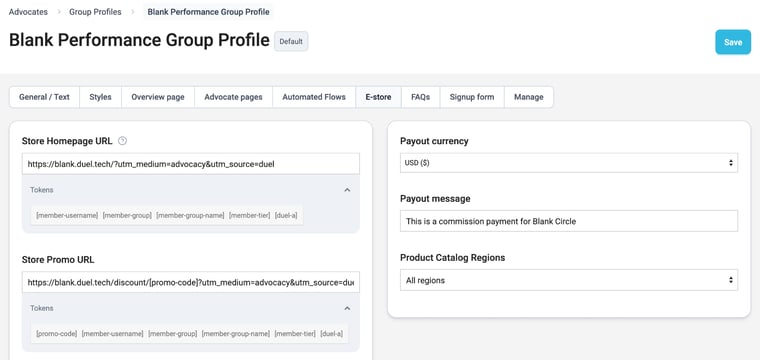
🏠 Store Homepage and Promo URLs
The Store Homepage URL is where your advocates' affiliate links send people by default. Any query parameters you add to it, such as UTM tags, are passed on with every affiliate link. Duel also adds its own tracking to each link automatically, so you don't need to add it yourself.
The Store Promo URL is optional. When an advocate has an active referral code, their affiliate link uses this URL instead, so the code can be applied automatically at checkout. Use the [promo-code] token where the code should go, for example:
https://www.yourstore.com/discount/[promo-code]?utm_source=duel&utm_medium=advocacy
- When a Promo URL is set, Duel also adds a parameter that tells your store which page to send the shopper to after the code is applied, so links to a product or page still land in the right place (see Dynamic URL forwarding parameters).
- When a referral promotion ends, affiliate links go back to using the Store Homepage URL.
📚 Learn more: Hidden Referral Codes · Campaign-specific Affiliate Links · How advocates can customize their affiliate link
🏷️ Tracking parameters and tokens
Static parameters
Add fixed parameters to the Store Homepage and Promo URLs to track standard UTM values, such as source and medium:
https://www.yourstore.com/?utm_source=duel&utm_medium=advocacy
Dynamic tokens
Tokens are placeholders that Duel replaces with real values when someone clicks a link, so you can see which advocate, group or tier sent each visit. Open Tokens under a URL field to see the ones you can use there.
| Token | Replaced with |
|---|---|
[member-username] | The advocate's username |
[member-group] | The ID of the advocate's group |
[member-group-name] | The name of the advocate's group |
[member-tier] | The advocate's tier |
[duel-a] | Duel's attribution identifier for the click |
[promo-code] | The advocate's referral code (Store Promo URL only) |
Tokens can go anywhere in the query string. For example:
https://www.yourstore.com/?utm_source=duel&utm_medium=advocacy&advocate=[member-username]&group=[member-group-name]&tier=[member-tier]
When an advocate shares this link, a click arrives with values such as advocate=alex.g&group=Creators&tier=VIP.
⚠️ Copy token names exactly from the Tokens list. A misspelled token isn't replaced, so it reaches your store as plain text.
↪️ Dynamic URL forwarding parameters
Use this section when your store, analytics or affiliate network expects Duel's values under a parameter name of its own. Duel adds each parameter to every affiliate link, so you don't need to edit the URLs above.
- Click Add.
- Enter the Parameter name your system expects, for example
utm_content. - Choose the Value: Advocate username, Advocate group ID, Advocate group name, Advocate tier or Duel Clickthrough Referral Identifier.
- Click Save.
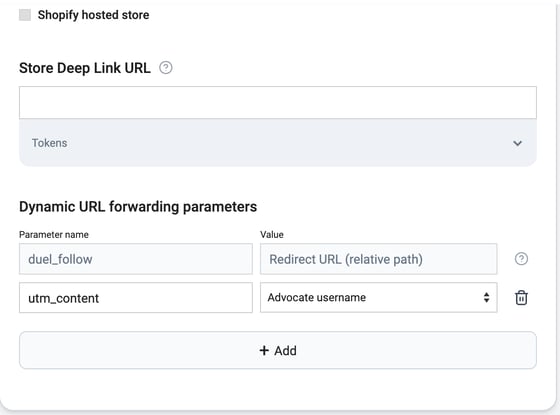
ℹ️ The greyed-out first row appears when a Store Promo URL is set. Duel adds this parameter automatically to tell your store where to send the shopper after the promo code is applied. It's called duel_follow, or redirect for Shopify hosted stores, and it can't be edited.
🛍️ Shopify hosted stores
If your store runs on Shopify, tick Shopify hosted store. This makes product links and promo code links redirect the way Shopify expects, including when you use discount codes or dynamic parameters.
📱 Deep linking
The Store Deep Link URL takes a universal link from your deep linking platform. AppsFlyer and Branch links are supported. It works with both the Store Homepage URL and the Store Promo URL: Duel passes the full destination URL through the deep link, along with your dynamic URL forwarding parameters.
You can then set rules in your deep linking platform, for example:
- If the shopper has your app installed, open the app.
- If not, send them to your mobile or desktop website.
💸 Commission settings and product regions
If you pay commission through Duel's automated PayPal integration, you can set:
- Payout currency: the currency advocates are paid in.
- Payout message: the message shown in the PayPal payment email advocates receive.
Product Catalog Regions sets which regional product catalog the group sees, so advocates get the right products and prices. See Product Catalogue for how regions work.
✅ Setup and testing
- Go to Advocates › Groups › Group profiles, select the group profile and open E-store.
- Enter your Store Homepage URL (required), with any static parameters and tokens.
- Add a Store Promo URL and a Store Deep Link URL if you use them.
- Add any Dynamic URL forwarding parameters your systems need.
- Set the payout currency, payout message and product catalog region, then click Save.
Test your links
- Log in to your portal as a test advocate, copy their affiliate link and open it in a private browser window.
- Check the address bar and your analytics tool to make sure every token has been replaced with a real value.
- If you use a Store Promo URL, test with an advocate who has an active referral code, and check the code is applied at checkout.
Best practices
- Use short, clear parameter names, such as
advocate,groupandtier. - Keep the same parameters across the Homepage, Promo and Deep Link URLs.
- Combine tokens with UTM tags for full attribution.
- Don't put personal information, such as email addresses, in URLs.