![duel_logotype-1.png]](https://info.duel.tech/hs-fs/hubfs/duel_logotype-1.png?height=37&name=duel_logotype-1.png)
Earned Media Value (EMV) estimates what you’d pay in social ads to get the same reach and engagement your advocates’ posts earned. Duel works it out for every Facebook, Instagram and TikTok post your advocates submit through challenge action steps, then adds those values together.
EMV is one part of Advocacy Value: Advocacy Value = Attributed Revenue + EMV. EMV is not included in your revenue figures.
🧮 How EMV is calculated
EMV = EMV (CPM) + EMV (CPC)
- EMV (CPM), for reach: Impressions ÷ 1,000 × CPM rate. Impressions use the views the platform reports where they’re available, then reach, then follower count.
- EMV (CPC), for engagement: (Reactions + Comments) × CPC rate.
Posts that are banned or deleted aren’t counted.
ℹ️ Social metrics, including EMV, are refreshed for up to 30 days after a post goes live.
💡 Instagram views since July 2026: Instagram Reel and video views now come from Instagram’s play count (the “Views” number in the app). This applies from mid-July 2026 onwards, so posts tracked before then keep their earlier figures, and your Instagram EMV may be higher from July 2026.
💲 Your rates
Duel sets EMV rates for each brand, in USD. These are the defaults:
- Facebook: CPM $14.20 per 1,000 impressions, CPC $1.18 per engagement
- Instagram: CPM $10.80 per 1,000 impressions, CPC $1.18 per engagement
- TikTok: CPM $10.00 per 1,000 impressions, CPC $1.18 per engagement
Your brand may use different rates. To change a rate, speak to your Brand Partner (BP). New rates apply going forward, not to EMV that’s already been calculated, and changing a rate means comparisons with earlier periods are no longer like for like.
⚙️ See your rates in Settings
Admin operators can see the rates your brand is measured against:
- Go to Settings > Earned Media Value.
- Each platform shows its Reach (CPM) and Engagement (CPC) rate, marked Duel default or brand-specific.
- At the top, Rates in use and Last changed show whether your brand uses the defaults and when the rates last changed.
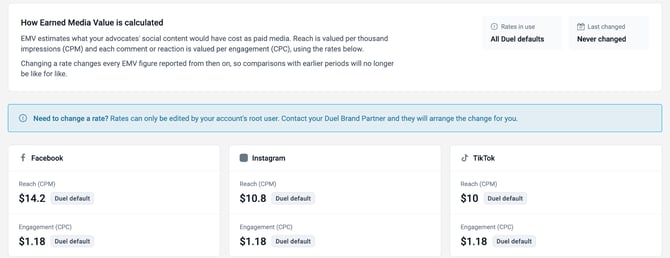
ℹ️ The rates are read-only for admins. To change one, contact your Brand Partner and they’ll arrange it for you.
📍 Where to find EMV
💻 Go to Insights. On the new Insights dashboard, EMV is under Advocacy Value & Revenue, and View data glossary has the full definition of every metric. On the previous version of Insights, EMV is on the Social tab. See Insights dashboard for more.