![duel_logotype-1.png]](https://info.duel.tech/hs-fs/hubfs/duel_logotype-1.png?height=37&name=duel_logotype-1.png)
The Decision Log is a record of every moderation decision on your program: who was accepted or rejected, why, and whether an operator or Duel made the call. You can filter it on screen and export it as a CSV for compliance and operational reviews.
📑 On this page
🗂️ Where to find the Decision Log
Where the Decision Log lives depends on how moderation is set up for your program.
- If your program uses Moderation Intelligence: go to Settings > Moderation Rules > Decision log. It has two tabs: Sign-ups for applicant decisions and Activity for challenge submission decisions. Each tab has its own Export button.
- If your program uses Advocate Evaluation or Challenge Evaluation: go to Settings > Account > Advocate Evaluation or Challenge Evaluation, then open the Decision Log tab.
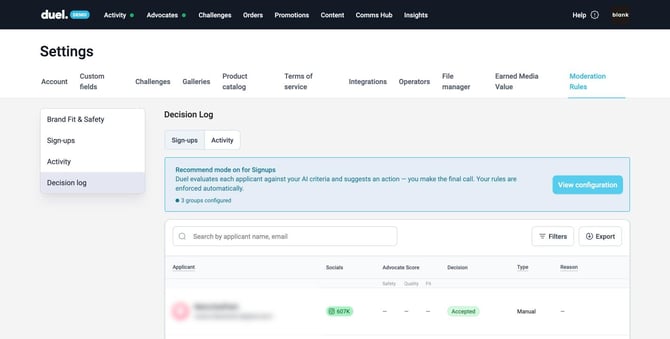
Any operator on your brand can open, filter and export the Decision Log.
🏷️ How decisions are labeled
In the Sign-ups tab, the Type column shows how each decision was made:
- Manual: an operator made the decision.
- Smart: automated moderation scored the applicant and made the decision.
- Automated: your group’s admission settings accepted the member without moderation. For example, in an open group anyone who verifies their email is accepted, and the same applies to single sign-on sign-ups into that group. These show the Accepted badge, with the reason in the Reason column.
Decisions that Duel made automatically show System as the operator.
To narrow the log, click Filters. You can filter by Operator, Date, Advocate Score, Decision, Decision Type (Manual, Smart or Automated) and Reason.
💡 Good to know: automatic accepts from before this change still read Smart, because the log has no record of why they were accepted. Who gets accepted hasn’t changed, only how the decision is labeled.
⬇️ Export the Decision Log
- Open the Decision Log (and the Sign-ups or Activity tab, if you have them).
- Click Export.
- Choose:
- Duration: Last 30 days, Last 90 days, Last 6 months or Last 12 months
- Type: All Actions, Accepted or Rejected
- Source: All Sources, Manual (Operator) or Automatic (System)
- Click Export to download the CSV.
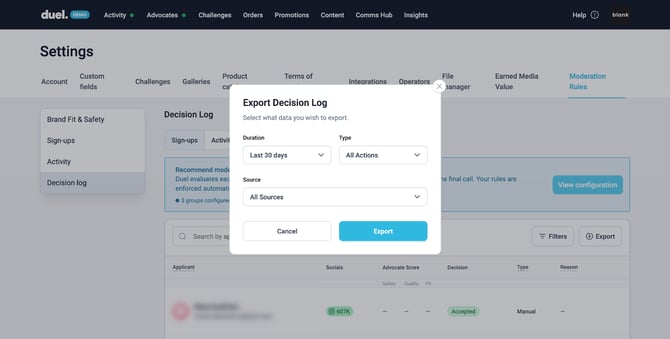
Larger exports can take several minutes. When that happens, Duel tells you the file will be on your Downloads page when it’s ready.
ℹ️ Filtering a downloaded sign-ups file? The Method column now reads Smart or Automated for automatic decisions, where it used to read System. If you filter your files on System, filter on Smart or Automated instead.
📋 Sign-ups export columns
- Advocate ID, Advocate Name and Advocate Username
- Instagram username and TikTok username
- Brand Safety Score, Content Quality Score and Brand Fit Score
- Legacy AI Score (the single AI score, previously called AI Score)
- Recommended Decision and Recommended Decision Reason
- Action (Accepted / Rejected)
- Reason
- Method (Operator, Smart or Automated)
- Operator Email
- Date (UTC)
Some score cells can be blank, for example for applicants who haven’t been scored. If no applicant in the period you export has a Brand Fit Score, that column is left out of the file.
📋 Activity export columns
- Advocate Email and Advocate Name
- Task (the challenge) and Action Type
- Post URL
- AI Score
- Decision (Accepted / Rejected)
- Reason: the reason the operator chose when they rejected the submission, or the system’s reason for automatic decisions
- Note: the operator’s free-text note
- Method (Operator / System)
- Operator Name
- Date (UTC)
If no row in your export has an operator note, the Note column is left out of the file.
🗃️ Advocate Evaluation and Challenge Evaluation exports
If your program uses Advocate Evaluation or Challenge Evaluation, the export works the same way. Columns with no data in the date range you choose can be left out of the file. For example, if no applicant in the range has an AI score, the Legacy AI Score column won’t appear.
Advocate Evaluation export columns
- Advocate ID
- Advocate Name
- Advocate Username
- Social platform usernames (Instagram, TikTok and so on)
- Legacy AI Score (previously called AI Score)
- Recommended Decision Reason
- Action (Accepted / Rejected)
- Reason
- Method (Operator, Smart or Automated)
- Operator Email
- Date (UTC)
Challenge Evaluation export columns
- Advocate Email
- Advocate Name
- Task (the challenge)
- Action Type
- Post URL
- AI Score
- Decision (Accepted / Rejected)
- Reason (the operator’s chosen reason, or the system’s reason)
- Note (left out if no row has one)
- Method (Operator / System)
- Operator Name
- Date (UTC)