![duel_logotype-1.png]](https://info.duel.tech/hs-fs/hubfs/duel_logotype-1.png?height=37&name=duel_logotype-1.png)
How Advocates Can Update Their Email Address
If the Advocate Can’t Access Their Old Email
How Brand Operators Can Update an Advocate’s Email Address
How Advocates Can Update Their Email Address
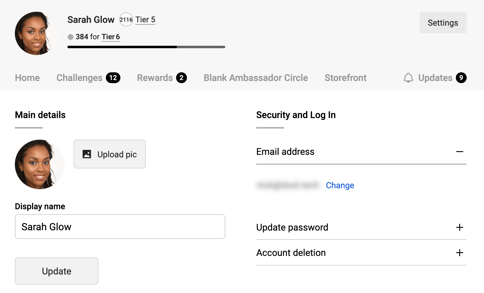
Advocates can update their email directly from their account settings.
-
Log in to the program.
-
Click Settings in the top right.
-
Click change, then enter new email address in the Email field.
-
Save your changes.
- They'll then receive an email with a link to confirm the change and once clicked they can login with the new email.
If the Advocate Can’t Access Their Old Email
If an advocate no longer has access to their registered email address and are unable to log in, a brand operator can update it on their behalf.
How Brand Operators Can Update an Advocate’s Email Address
-
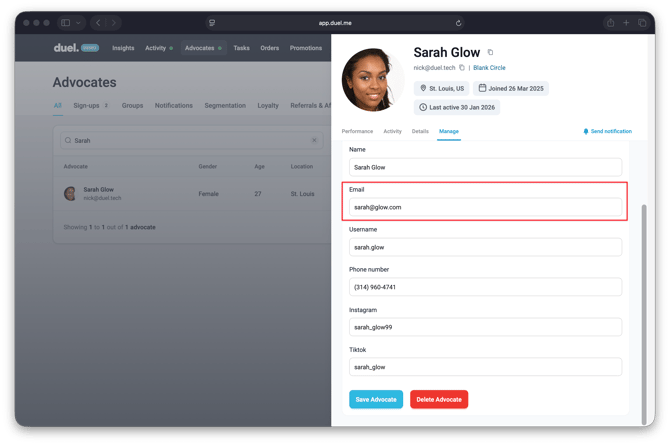
Log in to the Duel dashboard.
-
Go to the Advocates tab.
-
On the All tab, use the search bar to find the advocate using their current registered email address or name.
-
Click on the advocate’s profile.
-
Select Manage.
-
Under the Email section, update the email address.
-
Click Save to confirm the changes.
- An email will be sent to both the old and the new advocates emails to confirm the change.