![duel_logotype-1.png]](https://info.duel.tech/hs-fs/hubfs/duel_logotype-1.png?height=37&name=duel_logotype-1.png)
Who this is for: your customer service team, when an advocate (a member of your ambassador programme) contacts you. You don't need to know the Duel platform. Most questions can be answered from this page; the rest go to your brand team (the people at your brand who run the ambassador programme in Duel). Duel's support team is the last step, not the first.
How to use it: use the contents below to jump to a topic, then click a question to open its answer. Each answer says what to check first, what to tell the advocate, and when to pass it on. Look for these markers:
🔍 What to check · 📍 Where to find it · 🛠️ Steps to resolve · ✅ Expected result · 🚦 When to escalate · 💡 Good to know
📑 On this page
🏷️ Your programme details. Some answers depend on how your programme is set up. Ask your brand team for these once and keep them to hand:
- Programme login page
- Your brand team (name and how to reach them)
- Return window before commission is paid (number of days)
- How gifts are sent: a reward code, a "claim your reward" challenge, or a parcel from your team
- E-commerce contact (code and checkout questions)
- Fulfilment or gifting contact
⚡ Quick answers: the 5 most common questions
⚡ If you only read one part of this page, read this. These five cover most of what advocates ask. The full answers are further down.
| The advocate says… | What to tell them | 🚦 Pass it on to |
|---|---|---|
| "My post says post not found" | Check the post and account are public, the hashtags are in the caption (not a comment), and the link is the post's own link. Then resubmit. | Brand team, if all of that is right |
| "My code doesn't work" | Check for typos, minimum spend, excluded or sale items, region and expiry. Reward codes are usually single-use. | E-commerce team for shop rules; brand team for a replacement code |
| "I haven't received my free product" | Gifts are sent by the brand, not Duel. Check their email, spam and programme account for a code, or that they completed the "claim your reward" challenge. | Fulfilment or gifting team |
| "My post hasn't been approved yet" | The brand's team reviews every post, and points are added once it's approved. | Brand team, if it's taking longer than usual |
| "I need to change my address or handle" | Address: Settings → Your address → Edit, if their programme has it. Handles and date of birth can't be changed by advocates. | Brand team |
🧭 Who handles what
🧭 Four teams can help, and each owns a different kind of question. Use the table or the flowchart to send a query to the right place first time.
| Who | Handles |
|---|---|
| Your customer service team | The questions on this page: codes, gift and delivery questions, payment timings, login problems, changing an email, why a post wasn't accepted, where to find things |
| Your brand team | Anything that needs the Duel dashboard: approving or rejecting posts; checking an advocate's orders, points or codes; issuing a new code; adding points; changing an advocate's details; application decisions; programme rules such as follower minimums, commission rates and which challenges each advocate can see |
| Your e-commerce team | How codes and vouchers behave at checkout: minimum spend, exclusions, delivery, combining codes, region and expiry |
| Your fulfilment or gifting team | Sending free products, gifts and PR packages, and tracking them. Duel doesn't ship products. |
| Duel support | Only when your brand team has checked and something still looks broken. Your brand team raises it through the Duel Support Portal or by emailing brandsuccess@duel.tech, which goes to Duel's support team. This address is for brand teams only: please don't share it with advocates. |
Who to pass it to, at a glance:
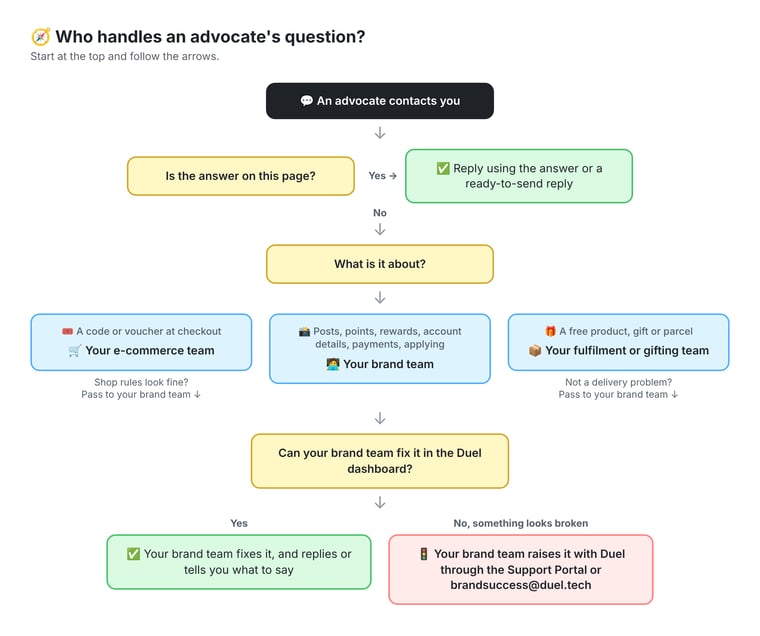
💡 Important tip: when you pass a query on, include:
- the advocate's name and the email they signed up with
- what they're asking
- what you've already checked
- any screenshot, order number or date
This saves a round of questions.
📸 Challenges and posts
📸 The most common topic. Advocates complete challenges by posting on social media and submitting the link. Most problems come from a private post, missing hashtags or the wrong link, and you can fix those with the advocate. Approving or rejecting posts is for your brand team.
"My post is live and has all the hashtags, but it says 'post not found'"
The most common submission problem.
🔍 What to check (ask the advocate, or open the post yourself):
- The post and account are public. A private account, or an account restricted to 18+, can't be checked.
- The hashtags and mentions are in the caption, not in a comment, and near the start of the caption.
- On Instagram, the caption doesn't have more hashtags than Instagram allows.
- The link is the post's own link, copied with Share or Copy link (not a profile link).
- The advocate hasn't changed their Instagram or TikTok handle since joining. If they have, the post won't match their account until your brand team updates the handle.
🛠️ Steps to resolve: fix whichever of the above is wrong, then resubmit.
✅ Expected result: the submission is accepted for review.
🚦 When to escalate: pass to your brand team with the post link if everything above is correct. Duel is still fixing some cases where real posts are wrongly rejected, so your brand team can raise these with Duel.
"How do I make sure my post is accepted?"
Follow the challenge instructions exactly:
- Use every hashtag and mention asked for, near the start of the caption (long captions can hide them)
- Keep the post and the account public, with comments switched on
- Post the format asked for (for example a Reel, not a photo)
- Submit the link to the post itself, copied with the app's Share or Copy link button, not a link to their profile
- If the challenge asks for a link in the caption or bio, add it as instructed
- Tick any agreement box on the challenge (for example the terms of service or an updated Scope of Work) before pressing Submit
"It says my post was already submitted, but it's new"
Each post can only be used once across the whole programme. Resubmitting the same post (for example after a rejection, or to a repeatable challenge) is treated as a duplicate unless the caption has been changed.
🛠️ Steps to resolve: if it's the same post, ask the advocate to edit the caption and resubmit. If it's a genuinely new post, pass it on.
🚦 When to escalate: pass to your brand team with the post link. Duel is still fixing some false "already submitted" errors on new posts.
"I submitted the wrong link or the wrong post. How do I fix it?"
Advocates can't edit a submission after sending it.
🛠️ Steps to resolve: pass to your brand team. If the submission is still pending, they reject it in Activity > Pending, and the advocate can resubmit the right post while the challenge is still open.
✅ Expected result: the advocate submits again with the correct link.
"How do I submit an Instagram Story?"
Story challenges usually ask the advocate to upload a screenshot of their published Story and paste the Story's link. Follow each challenge's steps, and submit straight away, because Stories disappear after 24 hours.
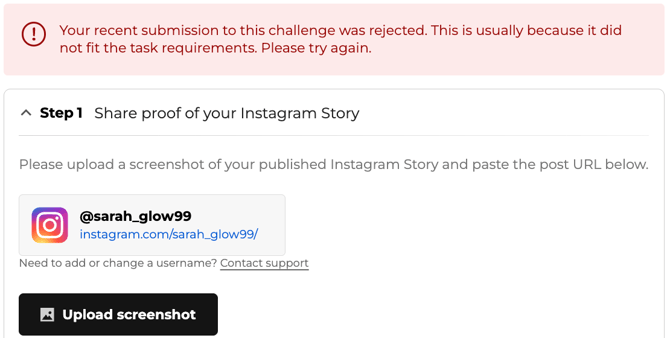
💡 Good to know: if the account shown isn't theirs, or their handle has changed, they need to contact support, because advocates can't change usernames themselves.
"The challenge says TikTok but only accepts an Instagram link" / "There's nowhere to paste my link"
This usually means the challenge is set up for a different post type.
🚦 Pass to your brand team so they can fix the challenge.
"I submitted my post but it hasn't been approved yet"
Posts are reviewed by the brand's team, so how long it takes depends on your programme. Points are added once a post is approved.
🚦 Pass to your brand team if: it's been longer than your programme usually takes. They can see every submission waiting for review.
"My submission has disappeared"
A submission that's no longer showing as pending has usually been reviewed: it was either approved or rejected. A bug that made pending entries on repeatable challenges disappear was fixed on 9 Oct.
🚦 Pass to your brand team: they can see what happened to it in Activity (Pending, Accepted, Hidden, Rejected) and why.
"Why was my post rejected?" / "I wasn't told why"
The most common reasons are missing hashtags or mentions, a private post, the wrong format or the wrong link. The brand may also reject posts that don't fit the brief.
When a post is rejected, the advocate gets a notification in the programme showing the reason, what to fix and any note from the brand, with a button to resubmit while the challenge is still open. This is on for all programmes since 21 October 2026. No email is sent, and rejections made in bulk or automatically don't include feedback. If your programme doesn't have this yet, advocates see a general message: "Your recent submission to this challenge was rejected. This is usually because it did not fit the task requirements. Please try again."
🚦 Pass to your brand team if: the advocate disagrees with the decision. Approving and rejecting posts is the brand's decision.
"Will my post be reviewed before the deadline?" / "My Story expired before it was checked"
Pass to your brand team, with the challenge name and deadline. Stories disappear after 24 hours, so story challenges need checking quickly.
"My repeatable challenge hasn't reopened" / "I can't see any challenges"
Repeatable challenges reopen on a schedule set by the brand, and challenges can be limited to certain groups, levels or platforms (for example a minimum number of followers on TikTok).
🚦 Pass to your brand team if: the advocate can't see any challenges at all, or one should have reopened.
"Where do I find the latest challenges?" / "When will a challenge be back?"
In their programme account: each challenge shows its instructions, required hashtags and mentions, and any dates. When a challenge returns is up to the brand.
🚦 Pass to your brand team for questions about upcoming challenges.
"I got an email about a challenge but can't see it" / "I can't access the latest challenge"
Brands can show challenges to some advocates only (for example certain groups or levels), and challenges can have start and end dates. So it may not be open to this advocate yet, or it may have ended.
🚦 Pass to your brand team if: the advocate should be able to see it.
"Can I take part in several challenges at once?"
Usually yes: advocates can work on any challenge open to them. Some challenges can only be completed once, others can be repeated within limits set by the brand.
"My video won't upload"
Files must be under 30MB. For video, .mp4 or .mov work best. Ask them to compress the file, or try a computer: some phones grey out video files in the upload window.
🚦 Pass to your brand team if: it still fails on a computer with a small file.
"Can I edit a post I've already submitted?" / "I missed the deadline, can I still submit?"
- Editing: no, a submission can't be edited after it's sent. If it's wrong, the brand team can reject it so the advocate can resubmit (see I submitted the wrong link).
- Missed deadline: once a challenge has closed, advocates can't submit or resubmit to it. Challenges with an end date show how long is left on the challenge card (for example "12 days").
- Submitted before the deadline but reviewed after it: pass these to your brand team.
🎟️ Codes and discounts
🎟️ Advocates have two kinds of code: a referral code to share with customers, and reward codes they earn. Codes are created in Duel but checked by your shop, so most "code doesn't work" questions are answered by your e-commerce team.
"My referral or discount code doesn't work at checkout"
🔍 What to check: what kind of code it is.
- Referral code: the advocate shares it with friends and followers. It's usually multi-use and meant for the customer they refer.
- Reward code: given to the advocate as a reward (for example for completing a challenge or reaching a new level). It's usually single-use, so once used it won't work again.
The exact rules vary by programme and reward.
📍 Where to check: your e-commerce platform. Look for typos or spaces in the code, minimum spend, excluded products, sale items, region or storefront (for example a code issued in one currency or country), usage limit and expiry. These rules are set in your shop, not in Duel, so a code can be valid in Duel and still be refused at checkout. Duel's "gift cards" are fixed-value codes, so they follow the same shop rules.
🛠️ Steps to resolve: if a shop rule is the cause, explain it to the advocate or ask your e-commerce team to adjust the code.
🚦 When to escalate: pass to your brand team if the code is unused and none of the above applies, or the advocate needs a replacement. Your brand team usually issues a replacement through a hidden (unlisted) challenge.
💡 Good to know: if an advocate uses their own referral link or code, the discount still applies, but they don't earn commission on that order.
"My reward voucher only took off the delivery cost" / "It only took off part of the value"
This is how the code is set up in your shop, for example as a gift card that applies to the whole order including delivery, a minimum spend, or a limit to certain products or one item.
🚦 Pass to your e-commerce team: they can check the code's settings. Your brand team can issue a replacement if the code was set up wrongly.
"My code says it's already used or has no balance, but I never used it"
The most common confirmed cause is that an order using the code was cancelled or returned, and the code wasn't restored. Some shops may also hold a code that was added to a basket that wasn't completed; check with your e-commerce team.
🚦 Pass to your brand team: they can check the code and issue a new one.
"My code says expired before the date I was given"
Check the code's end date in your e-commerce platform against what the advocate was told.
🚦 Pass to your brand team to issue a new code if it expired early.
"Where do I find my discount code or affiliate link?" / "I only have a link, not a code"
📍 Where the advocate finds it: on the programme's Home page, under Earn While You Share: their Affiliate Link and Referral Code, each with a Share Now button. Some programmes give advocates a link only, with no code, depending on how the programme is set up.
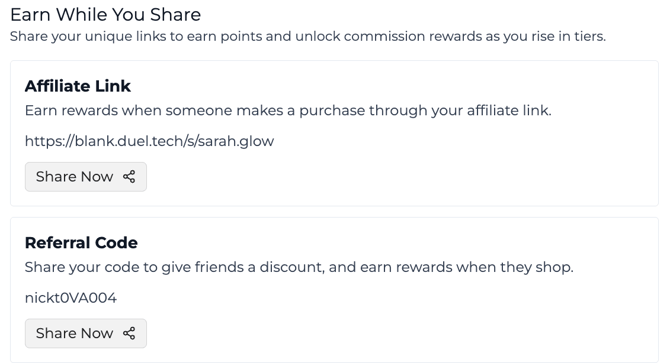
📍 Where your brand team can check: the advocate's profile in the dashboard, Advocates > [advocate] > Performance > Engagement, shows their referral code and affiliate link, which the brand team can copy and send.
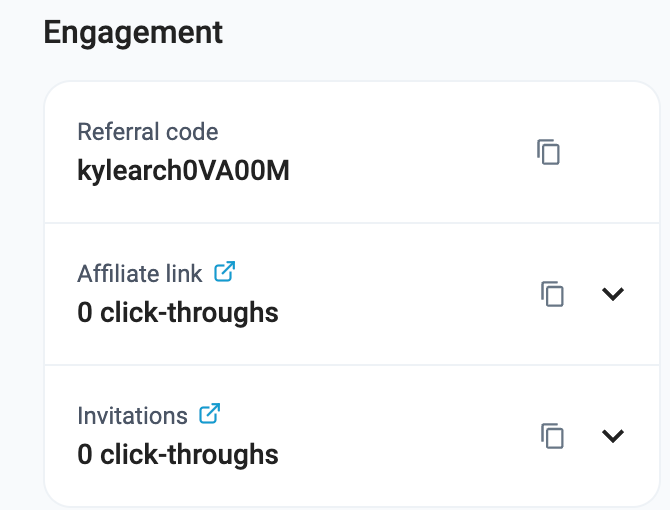
🚦 When to escalate: pass to your brand team if the advocate should have a code and none is shown.
"I reached a new level but can't find my reward code"
Reward codes appear in the advocate's Rewards tab: each unlocked level and reward is listed with its code and the date it was unlocked. They may also be emailed.
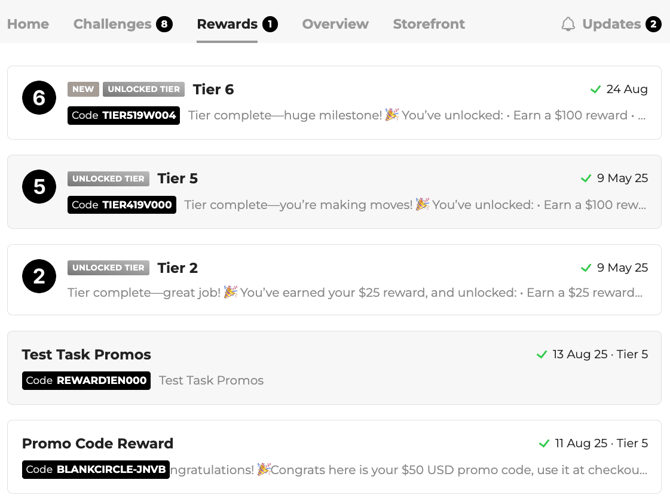
🚦 Pass to your brand team if: it isn't there. They can check whether it was issued.
"Can I use two codes together?" / "There's no code box in the app"
Whether codes can be combined, and where to enter them, depends on your shop. Check with your e-commerce team.
"I've been accepted but haven't received my discount code"
Codes are sent when the advocate joins or reaches the step that unlocks them, and can also be found in their programme account. Ask them to check there and in their spam folder.
🚦 Pass to your brand team if: it isn't there. The programme may have run out of codes, and the brand team can issue one.
"My code has expired. Can I get a new one?"
Codes can expire on an end date or when they reach a usage limit. Check the dates and limit in your e-commerce platform.
🚦 Pass to your brand team if: the advocate should still have a valid code (for example a reward they earned). Your brand team can issue a new one.
"My friend used my link but didn't get their welcome discount"
🔍 Check first: that the friend used the advocate's link or code at checkout, and checked their spam folder if the discount is sent by email.
Then: check the promotion is still active and the order meets its rules (for example new customers only, minimum spend).
🚦 Pass to your e-commerce team if the code itself didn't apply, or to your brand team if the promotion in Duel looks wrong.
"Can I use my voucher in store?" / "Do I pay for delivery?"
These depend on how your e-commerce team set up the code. Check with them; Duel doesn't control this.
🎁 Free products and gifts
🎁 Free products are sent by your brand, not Duel: either as a code the advocate uses online, or as a parcel from your team. Start by finding out which one the advocate is waiting for.
"I haven't received my free product, gift or PR package"
Free products are sent by your brand, not by Duel. Brands usually deliver them in one of two ways:
- A reward code: the advocate receives a code (or gift card) to order the product themselves online. Ask them to check their email, spam folder and programme account for the code.
- A "claim your reward" challenge: the advocate completes a challenge to confirm their delivery details, then your team sends the parcel. Check they've completed it.
🚦 Pass to your fulfilment or gifting team for dispatch and tracking, or to your brand team if you're not sure how your programme sends gifts.
"I reached a new level but didn't get my gift"
Level rewards are set up by the brand and may be a code, a gift card or a parcel (see above). Check the advocate's email and programme account first.
🚦 Pass to your brand team if: nothing has arrived. They can check the advocate's level and whether the reward was issued.
"My gift arrived with something missing, damaged, or it's the wrong one"
Pass to your fulfilment or gifting team with the advocate's delivery details and what arrived.
"Do I have to buy the product for a challenge?" / "How do I get on the PR or gifting list?"
This depends on your programme: some challenges are for products the advocate already owns, others come with a gifted product. Gifting lists are decided by the brand.
🚦 Pass to your brand team for your programme's rules.
"My gift card is in the wrong currency" / "Can I use it in my country?"
Gift cards and reward codes are set up for a specific shop or region by your e-commerce team.
🚦 Pass to your e-commerce team or brand team: they can confirm where it works or issue the right one.
🔐 Account and login
🔐 Advocates can change their email and password themselves, and sometimes their address. Social handles, date of birth and anything to do with a flagged account go to your brand team.
"I need to change my Instagram/TikTok handle, date of birth or name"
Advocates can't change their date of birth or social handles themselves: their Settings page says to contact support. Pass to your brand team, who can update these in the dashboard: Advocates > [advocate] > Manage > Advocate Details (name, display name, date of birth, email, phone and each social handle). The advocate gets an automatic notification when their details change. A changed handle matters: until it's updated, the advocate's new posts won't be found.
If the advocate says a social account linked to them isn't theirs, pass it to your brand team too.
"I need to change my email address"
Advocates can do this themselves:
- Log in and click Settings (next to their name and points).
- Under Security and Log In, open Email address and click Change.
- Enter the new email, save, then click the confirmation link sent to the new address.
✅ Expected result: they log in with the new email from then on. The same section has Update password.
If they can't access their old email: pass to your brand team, who can change it for them.
"I need to change my address" / "My city isn't in the list"
One of the most frequent requests, often before a gift is sent.
Can the advocate do it? Yes, if your programme has address self-service switched on (being rolled out gradually). Steps: Settings → Your address → Edit. If they don't see Edit, pass it to your brand team quickly.
🛠️ Steps (for your brand team):
- Open Advocates, search for the advocate and open their profile.
- Go to the Manage tab and scroll to Advocate address.
- Type the new address into Search address and pick it from the list. This fills the city and postcode, and is the easiest fix when a city is missing from the drop-down.
- Click Save changes.
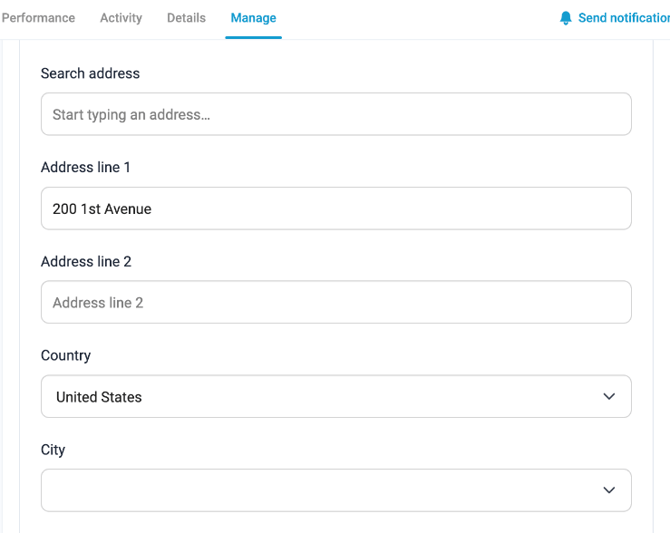
✅ Expected result: the new address shows in the profile and is used for future gifts.
💡 Good to know: if a gift is already on its way, the address may not change in time, so check with your fulfilment team. US addresses don't yet have a separate state field; Duel is working on it.
"My account is under review" / "My account has been suspended"
Duel automatically flags accounts that look suspicious (Duel Detect). A flagged advocate sees an "account under review" message, and their earnings and payouts are paused until it's resolved.
🚦 Pass to your brand team: they review it in Advocates > Flagged advocates, and can see the reasons under the advocate's Manage > Flag History. They decide whether to unflag, whitelist or ban. Don't promise an outcome.
"I can't log in" / "How do I reset my password?" / "I'm getting an error"
Forgotten password:
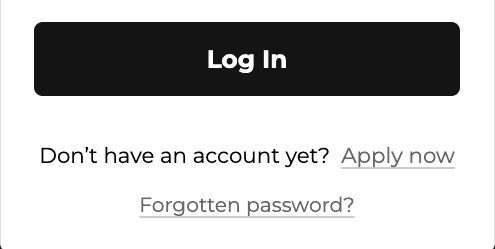
Step 1: on the programme's login page, click Forgotten password?
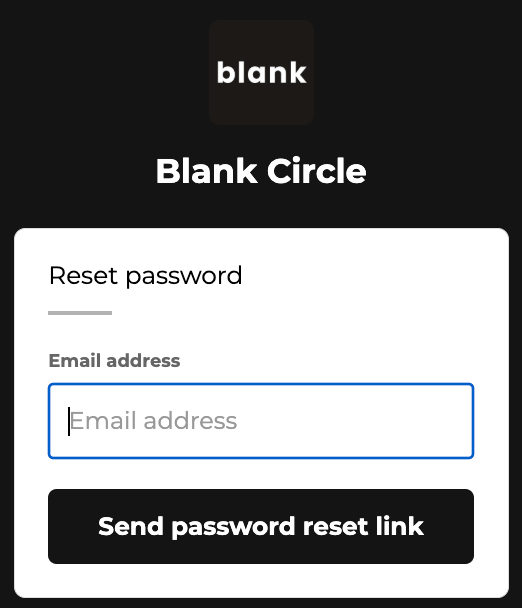
Step 2: enter the email they signed up with and click Send password reset link.
Step 3: open the email, follow the link and set a new password.
✅ Expected result: they can log in with the new password. If no email arrives, check spam and that it's the email they signed up with.
Other login problems:
- Clear cookies and cache for the programme website, or try a different browser.
- A blank page after logging in usually means an older iPhone software version: update the phone, or try on a computer.
- If they've just signed up, the verification email can take a while when lots of people join at once. Wait and check spam before signing up again.
🚦 When to escalate: pass to your brand team if none of these work. A screenshot of the error helps.
"My profile photo won't save" / "The app asks me to apply again"
A profile-photo upload problem was fixed in September, so ask the advocate to refresh the page and try again, ideally on a computer.
🚦 When to escalate: pass to your brand team with a screenshot if it still fails, or if a brand app asks an existing advocate to apply again.
"Is this email from the programme genuine?"
If an advocate isn't sure an email is real, tell them not to click links or share passwords, and pass it to your brand team to check.
"Where do I find my ambassador account?"
Each brand's programme has its own web address, where advocates log in to see challenges, rewards and earnings. Your brand team can give you the link to share.
🛍️ Storefront
🛍️ Each advocate has their own shop page, linked to their affiliate link, where they pin favourite products and show their approved posts.
"How do I add products or posts to my storefront?" / "I can't add more products" / "My post isn't showing"
The storefront (sometimes called an advocate page) is the advocate's own shop page linked to their affiliate link. Advocates choose its products and content themselves in their programme account.
- Products: advocates can pin up to 15 favourite products. To add another, they remove one first.
- Posts: a social post appears on the storefront only if it was submitted to a challenge with at least one product tagged and has been approved. Posts shared outside a challenge, or with no product tagged, don't appear. Only the first 5 tagged products show on a post.
🚦 When to escalate: pass to your brand team if a product they want isn't available to add, or an approved post with a tagged product still doesn't show.
⭐ Points and rewards
⭐ Advocates earn points for approved challenges and sales, and move up levels (tiers) to unlock rewards. Missing points are usually added by your brand team.
"My post was approved but I didn't get my points"
Points can take a little while to appear. If they still haven't shown after a day or so, it may be a display or sync issue.
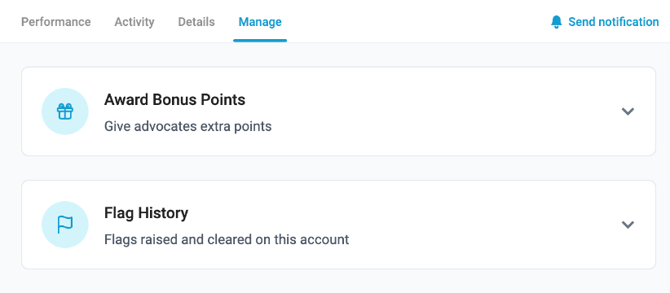
🛠️ Steps (for your brand team): check the submission in the advocate's Activity tab. If the points are missing, add them under Manage > Award Bonus Points.
✅ Expected result: the points show in the advocate's total.
"I bought something. Do I get points or commission?"
Shopping for themselves isn't how advocates earn in most programmes:
- Through their own link or code: this is a self-purchase. The discount applies, but no commission is paid on it.
- Without their link or code: the order isn't linked to the programme at all.
Don't promise points for purchases. The old "Loyalty" setting that gave points for advocates' own purchases was retired on 1 September. Advocates can see where their points came from on their Home page under How You Earned Points (challenges, social performance, affiliate revenue and other), and there is no purchase category.
"I can't redeem my reward"
🔍 Check first: whether the reward is a code that's already been used (reward codes are usually single-use) or has expired.
🚦 Pass to your brand team if: it's unused and still won't work. They can check it and issue a new one.
"I've done all the challenges but haven't moved up a level"
This is usually because the points for a challenge changed, or one completion wasn't counted.
🚦 Pass to your brand team: they can check the advocate's activity and add points manually.
"How long until my rewards show up?"
Rewards for referrals are held until the return window has passed, so they're confirmed only once the order is final. The window is set by your programme: often around 45 days, but some programmes use 30, 60 or 90.
🚦 Pass to your brand team if: it's well past your programme's usual window.
💷 Payments and earnings
💷 Advocates earn commission on orders made with their link or code. It's paid by PayPal once the order's return window has passed, so most "where's my money" questions are about timing.
"When and how do I get paid?" / "Why is my payment late?"
Commission is paid by PayPal (the only payout method) to the email address the advocate signed up with. It's paid once the programme's return window has passed, counted from the order date: often around 45 days, but some programmes use 30, 60 or 90. Totals can go down if an order is cancelled or partly refunded.
🔍 What to check:
- Is the order still inside your programme's return window? If so, it's not late yet.
- Does the advocate have a PayPal account on the email they signed up with? If not, the payment shows as Unclaimed: they can claim it by creating a PayPal account with that email, or change their programme email to match their PayPal.
- Is their account under review? Payouts are paused for flagged accounts.
🚦 When to escalate: pass to your brand team if the payment is well past the window, the PayPal email matches and the account isn't flagged.
"My referral shows as pending" / "My referral isn't showing"
👀 What the advocate sees: on their referrals page (called Home & Referrals in some programmes), three totals: Awaiting approval (orders still inside the return window), Awaiting payout (approved, not yet paid) and Paid to date. Order history lists each order with its date, value, commission and status, for example Cancelled if the order was cancelled or refunded.
🖥️ What your brand team sees: a more detailed status for each payment:
- Pending: still inside the return window
- Scheduled: approved and due to be paid soon
- Processing: sent to PayPal, waiting for confirmation
- Paid: received
- Unclaimed: no PayPal account matches their sign-up email
- Unrewarded: cancelled automatically; your brand team can see why
If it isn't showing at all: check the customer used the advocate's link or code at checkout. If not, the order can't be linked to the advocate. Blocked cookies or private browsing can also stop a link being tracked, which is why using the code is the safest option.
💡 Good to know: if an advocate leaves or is removed from the programme, pending commission isn't paid.
🚦 Pass to your brand team if: the customer did use the link or code and the order still doesn't appear after a few days.
"How do I track my referrals and earnings?"
In their programme account, on the referrals page (Home & Referrals in some programmes): totals for Awaiting approval, Awaiting payout and Paid to date, plus Order history with each order's status. The same page shows their commission rate for each level and the payment terms.
📝 Applying to the programme
📝 People apply to join, and the brand reviews each application. Questions here are usually about how long it takes or why someone wasn't accepted.
"Why was my application rejected?" / "How long does it take?" / "Have I been accepted?"
Applications are reviewed by the brand, usually within a couple of days. Places are limited, so not everyone who meets the criteria is accepted at once. Requirements such as a minimum number of followers are set by each brand, and a public social profile is needed. Accepted advocates receive a confirmation email and can log in to the programme.
🚦 Pass to your brand team for: your programme's exact requirements, or if someone has been waiting much longer than usual.
✉️ Ready-to-send replies
✉️ Replies to copy and send. Fill in the [brackets] and adjust them to your brand's tone. Each one matches an answer above.
📸 Challenges and posts
Post not found
Hi [name], thanks for getting in touch! Our system couldn't find your post, which usually means one of these: the post or your account is private, the hashtags are in a comment rather than the caption, or the link is to your profile rather than the post. Could you check those, then copy the link with the app's Share or Copy link button and submit again? If it still doesn't work, reply with the link and we'll look into it.
"Already submitted" error
Hi [name], thanks for letting us know! Each post can only be used once across the programme, so if you're resubmitting the same post (for example after it was rejected), please edit the caption slightly and submit again. If it's a brand-new post and you still see this message, reply with the link and we'll look into it.
Submitted the wrong link or post
Hi [name], no problem! Submissions can't be edited once they're sent, but we can reject this one so you can submit the right post while the challenge is still open. We'll let you know once that's done.
Instagram Story or video won't submit
Hi [name], for Story challenges, please upload a screenshot of your published Story and paste the Story's link, and submit straight away as Stories disappear after 24 hours. For videos, files need to be under 30MB, and .mp4 or .mov work best. If your phone won't let you pick the file, please try on a computer.
Waiting for a post to be approved
Hi [name], thanks for your patience! Every post is reviewed by our team, and your points are added as soon as it's approved. Reviews usually take [timeframe]. If you haven't heard by [date], let us know and we'll check on it.
Post rejected or no reason given
Hi [name], sorry your post wasn't accepted this time. The most common reasons are a missing hashtag or mention, a private post, the wrong format, or a link to your profile instead of the post. If the challenge is still open, you can fix it and submit again (please change the caption slightly if it's the same post). If you think it should have been accepted, reply with the link and we'll take another look.
Can't see a challenge, or when will it be back?
Hi [name], thanks for your message! Some challenges are only open to certain groups or levels, and each one has its own start and end dates, so it may not be open to you yet or may have ended. Repeatable challenges reopen on a schedule. Keep an eye on your account for new challenges, and we'll share any updates there.
🎟️ Codes, points and rewards
Code doesn't work at checkout
Hi [name], sorry about that! To help us check, could you send us the code, a screenshot of the message you see at checkout, and what's in your basket? Codes can be limited by minimum spend, excluded or sale items, region and expiry, and reward codes can usually only be used once. We'll come back to you as soon as we've checked.
Code says already used, but it wasn't
Hi [name], sorry about that! This can happen if an order using the code was cancelled or returned. Could you send us the code and, if you have it, the order number? We'll check it and send you a new one if needed.
Code expired early
Hi [name], thanks for letting us know. Could you send us the code and the date you were told it would last until? We'll check it and, if it expired early, send you a new one.
Voucher only took off delivery or part of the value
Hi [name], thanks for flagging this. How a voucher applies depends on how it was set up in our shop (for example a minimum spend or certain products only). We're checking with our team and will come back to you by [date].
Can't find a reward code
Hi [name], congratulations on reaching [level]! Your reward codes are in the Rewards tab when you log in to [programme link], listed with the date each one was unlocked. It's worth checking your spam folder too. If it isn't there, let us know and we'll look into it.
Friend didn't get their discount
Hi [name], thanks for sharing the programme! For the discount to apply, your friend needs to use your link or code at checkout, and the order needs to meet the offer's rules ([for example: new customers only, minimum spend]). If they did and it still didn't work, let us know the order date and we'll look into it.
Points missing after an approved post
Hi [name], thanks for your patience! Points can take a little while to appear after a post is approved. If they're still missing tomorrow, reply with the challenge name and we'll check and add them if needed.
Haven't moved up a level
Hi [name], thanks for getting in touch! You can see where your points came from on your Home page under How You Earned Points. We'll check your activity and make sure every completed challenge has been counted, and come back to you by [date].
🎁 Free products and gifts
Free product or gift not received
Hi [name], thanks for letting us know. [If gifts are sent as a code:] Your gift comes as a code to order it online: please check your email, spam folder and the Rewards tab in your account. [If gifts are posted:] We're checking with our gifting team and will update you with tracking as soon as we can.
Gift arrived damaged, incomplete or wrong
Hi [name], we're really sorry about that! Could you send us a photo of what arrived and confirm your delivery address? We'll pass it to our gifting team to put it right.
🔐 Account and login
Change of address
Hi [name], you can update your address yourself: log in to [programme link], click Settings, then Your address → Edit. If you don't see the Edit option, reply with your new address and we'll update it for you. If a gift is already on its way, it may still go to your old address, so let us know if that's the case.
Change of social handle or date of birth
Hi [name], thanks for letting us know! We'll update your [Instagram / TikTok handle / date of birth] for you. Until it's updated, posts from a new handle won't be found, so please wait for our confirmation before submitting new posts.
Change of email address
Hi [name], you can change this yourself: log in to [programme link], click Settings, then under Security and Log In open Email address and click Change. You'll get a confirmation link at your new address. If you can no longer access your old email, let us know and we'll update it for you.
Forgotten password
Hi [name], you can reset your password from the login page at [programme link]: click Forgotten password?, enter the email you signed up with and click Send password reset link. If the email doesn't arrive in a few minutes, please check your spam folder.
Can't log in or blank page
Hi [name], sorry you're having trouble! Please try clearing your cookies and cache, or using a different browser. If you see a blank page after logging in on an iPhone, updating your phone's software or trying on a computer usually fixes it. If it still doesn't work, send us a screenshot and we'll look into it.
Account under review
Hi [name], thanks for getting in touch. Your account is being reviewed by our team, and any earnings are paused until that's done. We'll be in touch once the review is complete.
💷 Payments and earnings
When will I get paid?
Hi [name], commission is paid by PayPal to the email address you signed up with, once the [X]-day return window for each order has passed. You can see what's awaiting approval, awaiting payout and paid on your referrals page. If you don't have a PayPal account on that email yet, please create one so your payment can go through.
Referral not showing
Hi [name], thanks for your message! Orders show on your referrals page once the customer has used your link or code at checkout. Blocked cookies or private browsing can stop a link being tracked, so sharing your code is the safest option. If your customer did use your link or code, send us the order date and we'll look into it.
Payment shows as unclaimed
Hi [name], your payment is ready, but we couldn't find a PayPal account on the email you signed up with. To receive it, please create a PayPal account with that email, or let us know if you'd like to change your programme email to match your PayPal.
Points or commission on my own purchase
Hi [name], thanks for your question! When you shop with your own link or code, you get the discount, but commission and points aren't given on your own purchases. You earn when other people buy through your link or code.
📝 Applying
Application status
Hi [name], thanks for applying! Our team reviews every application, usually within [timeframe]. Places are limited, so not everyone is accepted straight away. You'll receive an email as soon as there's a decision.
🔁 Passing it on
Asking for more details
Hi [name], thanks for getting in touch! So we can look into this, could you send us the email you signed up with, [a screenshot / the post link / the order number], and the date it happened?
Holding reply when you pass it on
Hi [name], thanks for the details. I've passed this to our programme team, who can look into your account, and we'll come back to you by [date].
🔗 More detail
🔗 For brand teams, and anyone who wants the full explanation, these Knowledge Base articles go into more depth.