![duel_logotype-1.png]](https://info.duel.tech/hs-fs/hubfs/duel_logotype-1.png?height=37&name=duel_logotype-1.png)
Duel can pay commission to your advocates automatically through PayPal, based on the rules you set in Referrals & Affiliates. For questions about your commission setup or a specific payment, contact your Programme Operator (PO). For commission rates or anything in your contract, speak to your Brand Partner (BP).
How automatic commission works
Commission statuses
Auto Payment Invoicing
What advocates see
Paying commission yourself
How automatic commission works
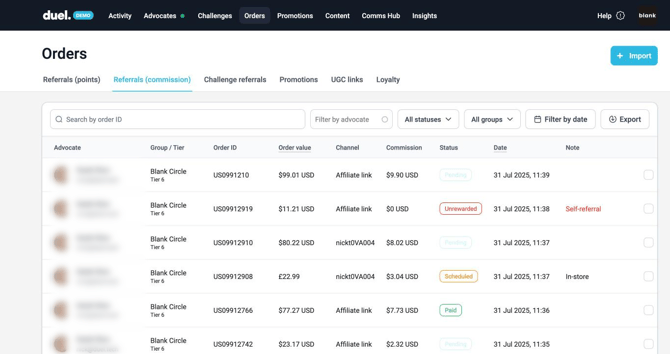
- When an order is credited to an advocate, it appears in Orders › Referrals (commission) with the commission it earns.
- The commission stays Pending during your return window, so cancellations and refunds can still change it.
- When the window ends, the commission becomes Scheduled. You set the window in Advocates › Referrals & Affiliates, under Mark pending orders as scheduled after [number] days.
- Scheduled commission goes out in Duel's next overnight PayPal payment run, within 24 hours.
Advocates are paid to the PayPal account linked to the email address they use to log in to the portal.
Self-purchases don't earn commission. If an advocate buys through their own code or link, the order still counts as advocate revenue, but no commission is paid. The advocate keeps any discount their code gives them. In the orders list, these show as Unrewarded with the note Self-referral.
To change commission rates on a set date, use the Schedule tab next to Rules in Referrals & Affiliates.
Commission statuses
You can filter the orders list by any of these statuses.
- Pending: the order is still inside your return window.
- Scheduled: the return window has closed, and the commission goes out in the next overnight PayPal payment run.
- Processing: the payment has been sent to PayPal, but PayPal hasn't confirmed it yet.
- Paid: the advocate has received the payment.
- Unclaimed: PayPal sent the advocate a link to claim the payment. This usually means they don't have a PayPal account with the email address they use in Duel.
- Returned: the payment came back, because the advocate didn't claim it or the payout was cancelled.
- Onhold: PayPal is reviewing the payout.
- Failed: the payout didn't go through.
- Cancelled: the commission was cancelled by hand before it was sent to PayPal.
- Unrewarded: Duel didn't pay commission on this order. The Note column says why, for example Self-referral.
If an advocate leaves or is removed from your program, any Pending commission isn't paid.
Auto Payment Invoicing
If your program uses automatic commission, you get one commission invoice a month. It includes any applicable processing fees.
- Based on order date: each invoice covers the orders placed in one calendar month, whenever the advocate was paid.
- Invoiced once orders lock: orders stay open for your return window, so returns can still change them. Once the window closes, rounded to whole months, the orders lock and Duel invoices them. An invoiced amount never changes afterwards.
- Timing: how long this takes depends on your return window. For most brands, it's about two months after the month ends.
- What's on it: only that month's orders, with the total order value and commission itemized.
- Corrections come separately: anything relating to an earlier month, such as a late return or a payment correction, arrives as its own corrections invoice or credit note.
To check an invoice: go to Orders › Referrals (commission), use Filter by date to select the month the invoice covers. These are the orders on that invoice. If something doesn't look right, contact your Programme Operator (PO).
The amounts haven't changed, only how they're presented on your invoice. This also doesn't change how or when your advocates are paid.
Your return window is set in the Referrals & Affiliates section of the dashboard.
Moving to order-date invoices (September 2026): Duel reissued the previous three months of invoices on the order-date basis and checked them against each brand's dashboard before sending. Anything you'd already paid was reconciled on a separate corrections invoice or credit note, itemized by month, so nothing was paid twice. Unpaid invoices in the old format were credited and reissued.
What advocates see
Advocates can see their commission totals in the referrals and affiliates module on the portal overview page, unless you've hidden it. Totals can go down if an order is cancelled or partly refunded.

- Commission is paid after your return window, plus up to a day for the payment run.
- Payments go to the PayPal account linked to the email address the advocate signed up with. If there isn't one, PayPal lets them create an account when the payment arrives. They can also change their email in the portal Settings to match an existing PayPal account.
- All commission payments are issued by Duel Holdings Limited.
Paying commission yourself
If you'd rather pay advocates yourself, turn on Disable automatic order commission management in Referrals & Affiliates. You can then track commission and mark it as paid in Orders › Referrals (commission).