![duel_logotype-1.png]](https://info.duel.tech/hs-fs/hubfs/duel_logotype-1.png?height=37&name=duel_logotype-1.png)
Update, October 2026: CRM Lifecycle Emails started as a pilot and are now live for most brands. The Group profile Email communications tab is now Automated Flows (Advocates > Groups > Group profiles > [profile] > Automated Flows), with Application, Account, Tier, Challenges and Digest emails. If you still see an Emails V2 toggle, ask your Brand Partner (BP). For the current guides, see Advocate Emails: Automated Flows Setup Guide and What Gets Sent and When. The rest of this page is kept as a record of the March 2026 release.
Why We're Launching V2 Emails
Introducing V2 Emails
What's New
How To Set It Up Benefits for Brands What's Next
🛠️ Why We're Launching CRM Lifecycle Emails
Managing advocate emails through Klaviyo created friction for brands — limited flexibility, a clunky editing experience, and a dependency on a third-party platform. Brands needed a simpler, more powerful way to communicate with advocates at every stage of their journey.
Common pain points included:
- No easy way to customise email content without HTML knowledge
- Limited control over branding across all email types
- No ability to set follow-up reminder emails
- Difficulty managing triggered emails in one place
✅ We've built CRM Lifecycle Emails from the ground up to give brands a fully in-house, easy-to-use email system that works out of the box.
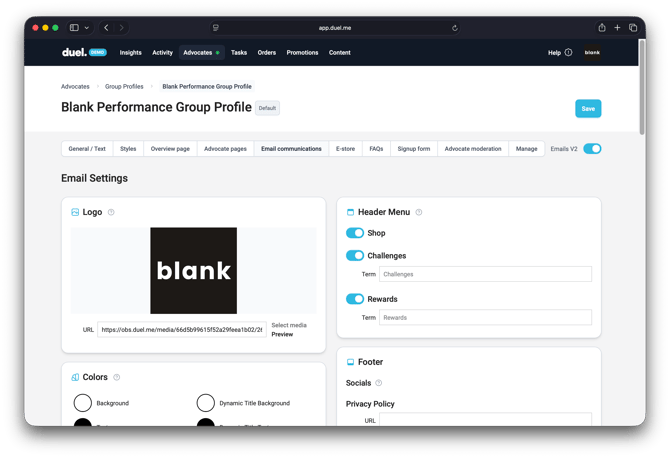
Screenshot from the March 2026 release. This tab is now called Automated Flows.
🚀 Introducing CRM Lifecycle Emails
V2 Emails replaces our old HTML builder with a native Duel email builder, giving brands complete control over every automated communication advocates receive — from application updates to tier unlocks.
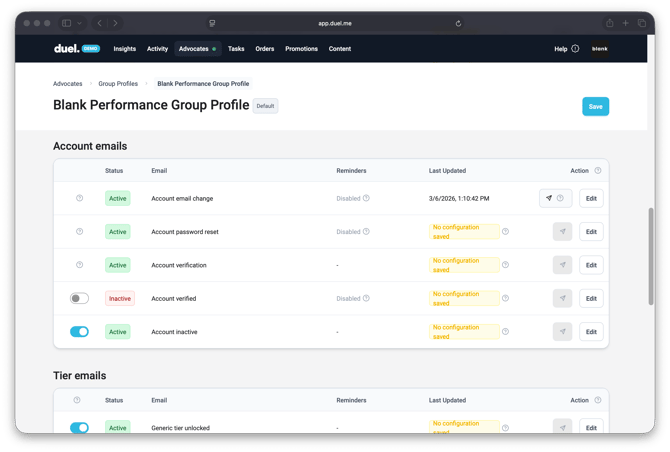
Screenshot from the March 2026 release.
✨ What's New
📧 Three organised email categories
All triggered emails are now grouped into clear sections:
- Application emails — acceptance and rejection emails
- Account emails — passwords, verification, and the inactive flow
- Tier emails — individual emails for each tier unlock, with follow-up capability
🎨 Global brand settings
Set your logo, brand colours, footer, and social icons once — and they apply across every email automatically.
🧩 Modular email builder
Add, remove, and reorder content blocks within each email. Choose from:
- Full-bleed image blocks
- Image + copy + CTA layouts
- Social proof callouts (e.g. tier progress, community stats)
- Affiliate link blocks
- Remaining challenges prompts
🔔 Reminder emails
Add one or more follow-up emails to any triggered email. Set rules based on inactivity or a fixed number of days after the original send.
📱 Test email sending
Send a preview of any email directly to your inbox to check how it renders on desktop and mobile.
⚙️ How To Set It Up
Head to our dedicated article:
🔮 What's Next
CRM Lifecycle Emails are the first of two phases. Coming next:
- Digest email updates — keeping advocates informed on programme activity
- SMS notifications — extending your comms beyond email
Both were in development at the time. Update, October 2026: digests and newsletters are now sent as Comms Hub campaigns where Comms Hub is switched on. Brands not yet on it keep the legacy digest under Automated Flows > Digest emails. SMS isn’t available.
If you have any questions or want a walkthrough of CRM Lifecycle Emails , please contact your Programme Operator (PO).